Speaking at PASS Summit and why you need to think about submitting….

This post is about the honor and experience of speaking at PASS Summit not once (2016) but twice (2017).

I recently received an email from PASS HQ that asked past speakers to share our success stories – to help others consider submitting for PASS Summit as a speaker.

This is an easy one for me – as I loved speaking at PASS Summit a lot.
Both times I learnt so many different things that helped me grow not only as a speaker but as a data platform technologist.

This is the first thing that I want to pass onto others who are considering submitting.

You will learn a lot:

When preparing a presentation you learn a lot when you prepare a presentation. You want to be ready to have questions. When selecting a topic I want to know as much about it to answer the questions attendees might have. Not just the basic questions but the more advanced ones that will help them implement/change the setup of whatever technology I am talking about.

The flow on effect of this was one particular area I was talking on (SQL Server on Linux) helped the company I was working at as it changed our direction and usage of the product. Now that is definitely a win | win situation!!

As a speaker I learnt a lot about speaking to crowds of people who are engaged and also want to learn from you.  This helped me grow as a speaker as I spent more time on preparation – so that I could deliver the content really well at an event like PASS Summit.

Disclaimer: I personally think I have a way to go before I’m a really effective speaker – but I speak about Continuous Improvement with technology so happy to embrace this with my speaking craft.

Here is your chance to pay it forward:

For years I had been a consumer of content, whenever I had an issue there were people who had written resolutions which had helped me with just about every part of our technology stack. I had also attended free conferences like SQLSaturday and Code Camp and had learnt so much that helped me manage/deploy/tune SQL Server.

By standing up in front of people I was replaying all the kindness of those people who had given up their time to help me. My tag line has always been “I speak so that I can help at least one person in the crowd learn..”.

The great thing has been after both my PASS Summit sessions I’ve had people stay behind and ask questions – which is great as it means that people were engaged and got something out of my session.

You are now part of a group of people who really care:

My first ever speaking engagement was with my good friend Martin Catherall, for years I had seen him speak and he was good enough to put in a co-speaking session for us both at SQLSaturday Oregon in October 2015. It was brilliant as it allowed me to try my hand at speaking with my good mate next to me for support.

By being part of the speaker group I then met some of the most awesome caring people, who really care about the community.

Start small and achieve greatness:

So let’s say you want to start speaking and giving back to the community, a great place to start and practice for speaking at PASS Summit is to support your local user group.

For a couple of reasons:

  1. It allows you to become an expert of your material and to grow in confidence as a speaker. Speaking to a room of 20 people whom I knew was a very rewarding experience and allowed me to get feedback on my material before going large.
  2. I run a user group and am always on the lookout for grass roots speakers and will support them by offering a slot at my SQL Server User Group. Because one of the hardest parts of running a User Group is finding speakers.
    So you know — win | win.

After speaking at a local user group — submit to your local SQLSaturday. I also run one and for the past 3 years I have offered new speakers the chance to speak in front of a larger more disparate crowd than their local User Groups.

So go ahead — think of a topic, write an abstract and submit!!

We need speakers like you in the community and PASS Summit needs more speakers to submit — so please take the plunge.  If nothing else — you now have a subject that you can support your local user groups and community conferences with.

The ultimate is that you get picked for PASS Summit and in a year or two write about your own experiences to help incubate another person to make a positive difference in our vibrant community.

Yip.

Why I am leaving a role/company I loved

This non-technical post is about why I am leaving a technical company after working there for 17 + years.

If you are thinking this will be a post that will resemble this:

Homer
DevOPs is never about burning bridges

then I’m sorry but you will be sadly disappointed.

My reasons for leaving are about doing new things rather than hating on the old things…

I resigned from my position as Operations Manager at Jade Software on 22nd December 2017, it was the 6,311th day that I had worked there. It was also the 6,969th day of my IT career — it seemed the right kind of day to do something huge.

Some people would say — but you didn’t work 6,311 days there — you’re counting weekends too!! To which I’d reply that when you work for a company that is energetic about doing things — it is infectious to be thinking about work on the weekends or writing emails/planning future work/projects.

It’s funny looking back at my time there — I originally was only going to work 23 months but I found after a year that I loved working there.

If you look at the longevity of the people that work there — there are people who’ve worked there over 30 years. It is that kind of company where people who are passionate about technology and stuff — stay. And they’re good people too!!

These people could easily leave and get really good money elsewhere. But they don’t because we believed in what we were doing there, that a lot of other things at Jade outweighed more money.

I was very lucky during my time at Jade to be part of a team of guys who were passionate, brilliant and committed to what we were doing. We socialised together and shared a love of getting the work done and having a beer, and eating hot n spicy food.

I think there is some saying that goes “why do do you go to work each day?” and the answer is “the people”. The reason I stayed so long at Jade was the people and the fact that every 5-8 years the company reinvented itself and/or did a stepwise change. It was exciting to be part of that. The culture at Jade was one of striving for excellence and also having fun along the way.

In some respects I used to think of Jade as this beautiful woman who was like a fickle mistress…. As at times I would drop everything to do things for my job. And have to explain to those dear to me why I was doing such things. Because it was awesome brilliant times making things – that others struggled with – work.

In a sense for those who loved this Jade woman – she consumed us, was at time a jealous lover but rewarded us well. As all fickle mistresses should.

On the day I resigned I bought 6 bottles of the wine below which inspired the above sentence (Note: I did not drink all 6 bottles at once to come up with the sentence above)

IMG_5550
Jade – the most enjoyable yet fickle of all mistresses….

So why leave?

One of the reasons I am leaving is so that there is a breath of fresh air within Operations.  16 years ago today (7/1/2002) I started as the Operations Team Leader – a newly created role and so I’ve led my team through new technologies, company-wide redundancies, introduction of SQL Server, NT4 —-> Windows 2016, removal of everyone being oncall and even PowerShell.

My aim over those years was to manage as I’d want to be managed. That we were a team which meant that my staff’s opinions mattered more than my own and that I wanted to be told if I was wrong – but I fully expected an answer/solution to what I was doing that was wrong. My staff knew that at 3am they could call me if they were stuck and if necessary I’d drive into work — because I expected the same. I didn’t like the word ‘manager’ as that just reminded me of David Brent like paper shufflers. I wanted to lead my team and for them to actively participate in the direction we’d go.

As a team.

BTW – telling my team I was resigning was hard.

Really hard.

The other reason I am leaving is around the fact that I left home when I was 18, I went to university to study Chemical Engineering in another city.

Leaving my (small) home town of Napier was hard at the time, in fact the first year was hell. But worth it — as it made me the man I am today.

And that in lies the analogy I’m using for leaving Jade, I learnt so many wondrous cool things whilst working there, my talent was incubated by some of the most technically brilliant people I’ve met. I matured as a person both technically and socially and now is time to leave ‘home’ again. To leave the confines and security of a job I loved and go out into the real world again.

So…..

I want to try my hand at consulting (and contracting) — some exciting news soon…

I want to help companies achieve some of the awesome stuff we did at Jade around DevOPs and specifically with databases.

I want to continue to make a difference in the community and help people learn (and laugh).

I want to make a fair bit of money so I can (finally) upgrade my car.

This next part of my career will be exciting, I am a little nervous about what the first few years will be like, but I feel it is time to leave. That nervousness BTW is what I use to drive myself, I thrive on energy whether it is good energy and not-so-good energy like stress. Before I speak — around 2 hours before I look like I’m going to throw up and a mess. But that is my way of centering myself and getting ready to make people laugh and learn.

So for the past 2 weeks — each day I have confronted the nervousness that I feel and remember how I felt on 11th September 2000 when I drove to my first day at Jade — I wrote a list of things I wanted to learn in the first 3 months…. because I was nervous I didn’t know enough. Thanks to some guys who would later become senior members of my team I’d learnt those things within 2 weeks.

That is the special kind of place Jade was — where the right kind of people would help you out, would go out of their way and also make you feel like ‘family’.  If I ever employ enough staff to have a team again I want to emulate what I did and the culture we had at Jade.

I’ll be sad to leave but so glad I stayed.

Yip.

Changing TFS to use HTTPS? — update your agent settings too….

This blog post is about Team Foundation Server (TFS) and is about the situation where you need remember to update your TFS Agent settings.

I will assume that you already have TFS setup and are just using HTTP and want to make things a bit more secure with HTTPS. I am also assuming that you will be using port 443 for HTTPS traffic.

To update TFS to use HTTPS you need to do a couple of things:

  1. Have a legitimate certificate installed on the server that you can bind to
  2. Have an IP address on the server and have firewall access setup to that IP address on port 443

So in IIS we will add our new binding to our Team Foundation Server website:

HTTPS Setup
IIS Setup for new binding of HTTPS

We will now go into TFS Administration Console to change our public URL. The added HTTPS binding will have flowed through from IIS and you should now see it in the bindings.

HTTPS Setup TFS Admin
Adding our URL to TFS Admin Console


So now we have HTTPS working for our TFS instance. Users can connect to the new URL and we can utilise URL rewriting to direct anyone who forgets and uses HTTP.

Except our first nightly builds failed…

HTTPS Agent failed
Automated Nightly Build Failure

Looking at the diagnostic logs on the agent we can see the following (note the time is UTC time):

[2017-12-07 13:30:05Z ERR Program] System.Net.Http.HttpRequestException: An error occurred while sending the request. —> System.Net.Http.WinHttpException: A security error occurred at System.Runtime.CompilerServices.TaskAwaiter.ThrowForNonSuccess(Task task)
at System.Runtime.CompilerServices.TaskAwaiter.HandleNonSuccessAndDebuggerNotification(Task task)
at System.Net.Http.WinHttpHandler.<StartRequest>d__101.MoveNext()
— End of inner exception stack trace —
at Microsoft.VisualStudio.Services.Common.VssHttpRetryMessageHandler.<SendAsync>d__3.MoveNext()
— End of stack trace from previous location where exception was thrown —

The logs also showed that the agent was trying to go to the old address. So it was a simple change to the agent settings to point to HTTPS address.

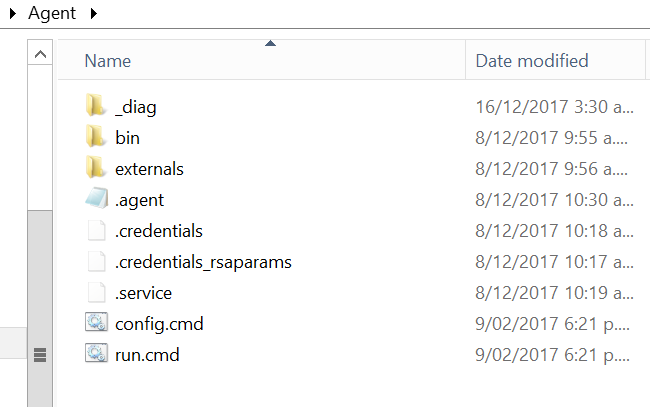
Browsing to where the agent is installed we can now edit the .Agents file:

Agent_Settings
Editing the .agent file

Within the .agent file we will change the following setting:

serverUrl: https://YourURL/tfs/

Kick off a queued build and it works as intended.

Yip.


SSRS won’t bind HTTPS to new certificate — “We are unable to create the certificate binding”

This blog post is around the situation where you have SSRS setup to use HTTPS and thus using a certificate and the certificate expires (or just needs replacing). We had caught the initial error via our Continuous Monitoring of the SSRS site — basically when the certificate expired we got an exception and alerted on it.

The client installed a new certificate but the issue arose where in Reporting Service Configuration Manager we went to use the new certificate but when we chose it we got this error:

We are unable to create the certificate binding

SSRS Cert issue
Error in SSRS Configuration Manager

And Reporting Service Configuration Manager removes the HTTPS binding.

We checked and the certificate is installed correctly.

So we looked in SSRS logs:

C:\Program Files\Microsoft SQL Server\MSRS11.<instance>\Reporting Services\LogFiles

It is amazing for a reporting system how badly errors are reported in the log files. Basically there was nothing in there at all:

rshost!rshost!964!12/11/2017-08:13:47:: e ERROR: WriteCallback(): failed to write in write callback.
rshost!rshost!2aa4!12/11/2017-08:13:47:: e ERROR: Failed with win32 error 0x03E3, pipeline=0x00000002780A7D80.
httpruntime!ReportServer_0-33!2aa4!12/11/2017-08:13:47:: e ERROR: Failed in BaseWorkerRequest::SendHttpResponse(bool), exception=System.Runtime.InteropServices.COMException (0x800703E3): The I/O operation has been aborted because of either a thread exit or an application request. (Exception from HRESULT: 0x800703E3)
 at Microsoft.ReportingServices.HostingInterfaces.IRsHttpPipeline.SendResponse(Void* response, Boolean finalWrite, Boolean closeConn)
 at ReportingServicesHttpRuntime.BaseWorkerRequest.SendHttpResponse(Boolean finalFlush)
library!ReportServer_0-33!2aa4!12/11/2017-08:13:47:: e 

--- End of inner exception stack trace ---;

We knew that HTTP was working all good so SSRS itself was “ok”. So on a hunch we decided to see if the old certificate was still lying around bound to something and so using netsh:

SSRS NETSH
NETSH showing the old certificate bound

So we then removed the binding — which was safe enough as only SSRS was serving web requests on this server — IIS was not being used at all.:

netsh http delete sslcert ipport=[::]:443

SSRS netsh delete
Removing the certificate that was still bound to port 443

We could then bind the new certificate in Reporting Service Configuration Manager:

SSRS now bound
SSRS is now happy and listening on port 443


So hopefully if you get this type of error you too can solve it nice and quickly and have your web service URL and Report Manager URL nice and secure again…

Yip.

How the gym made me a better database bloke…..

A blog post about how many reverse bicep curls or Romanian DeadLifts I can do…? As Rob Farley (t | b | w) would succinctly put it — “what the…??”

No it’s not.

But it’s related — if you’ve met me in person you’ll know that I’m tall – 6 foot 3 if I stand properly and generally within about 69 minutes of talking I’ll mention I used to be 130kg. I used to physically hurt as my back was not strong enough to carry that bulk around.

Something had to change.

I changed my eating habits, drinking habits (beer is a treat not a standard these days) and went to the gym.

I love data. More specifically I love numbers. And that was how I started liking the gym. I lift weights and do cardio and I initially record all the numbers associated with each session.

How many kilometers I biked, how much I could bench-press and how many repetitions I could do. And then — how many kgs I could lose.

I lost 16kg in 6 weeks during one period…

…..that was intense but rewarding.

Now as part of lifting weights I wanted to swap body fat for muscle. So I looked at how to build muscle. It involves tearing the muscle, which repairs itself and gets bigger.

Here is a link if you’re interested:

http://www.weightwatchers.com/util/art/index_art.aspx?tabnum=1&art_id=60361

On 11th September this year I celebrated 17 years at Jade Software. 17 years……

Yeah. It has been a pretty cool ride and my career has changed whilst being there – which is one reason why many people stay so long there.

But after 17 years I started to think — how can I grow my technical & management knowledge more?

By tearing my established skills a little.

So I have embarked on tearing my skills, by making myself slightly uncomfortable in the sense of technology & also management (I’m an Operations Manager after all).

I also read a lot of blogs/articles/websites whilst running on a treadmill, whilst hating running on a treadmill. It helps for 2 reasons:

Makes me forget I’m running on a treadmill.

I’m learning stuff.

So over the past 3 weeks I’ve spent most nights putting myself out of my comfort zone.

I’ve installed Team City and help DEV configure it.

I’ve learned heaps about running SQL Server on Docker.

I’ve learned a fair bit about Docker in the process…

I’ve done a lot more in Visual Studio Team Services (VSTS) than I have in the past year.

I’ve found out how brilliant the tools from RedGate (w )are in a DevOps Database deployment pipeline – namely Database Lifecycle Management

This is about extending myself, tearing my brain muscle to make it stronger (metaphorically bigger). To be able to extend how I use the Data Platform offered by Microsoft to:

#MakeStuffGo

But I’m not stopping there.

There are other areas coming up that I really want to tear it up in:

Running Kubernetes on Azure

Tuning SQL indexes like a boss (refer Rob Farley..)

ReadyRoll

Passing SQL exams — my last Microsoft certification was as a MCSE (NT4.0)

Become the guy who helps people migrate from TFS to VSTS

All of the above will benefit me.

Most of the above will benefit the company I work for.

That surely is a good reason to keep going to the gym.

Yip.


SQL Server 2017 — change the tag for your docker images

Firstly:

SQL Server 2017 is now officially released!

I have been using SQL Server 2017 running on Linux for a while now (blog post pending) and use the official images from:

https://hub.docker.com/r/microsoft/mssql-server-linux/

To get the latest I used to run

docker pull microsoft/mssql-server-linux:latest

However today I noticed that the :latest tag had been removed:

not_latest

~$ docker pull microsoft/mssql-server-linux:latest
Error response from daemon: manifest for microsoft/mssql-server-linux:latest not found

From the site above I read:

You may notice that the :latest tag has been removed. Please use the new tags going forward – either :2017-GA or :2017-latest.

So to get the latest image I just now run:

docker pull microsoft/mssql-server-linux:2017-latest

To get the Generally Available image:

docker pull microsoft/mssql-server-linux:2017-GA

When I started the container up and connected with SQL Server Management Studio I noticed that the version had jumped up a bit:

Original Image:

Original

GA & Latest:

GA

For now GA and Latest are the same version (kind of makes sense seeing as it was only released today….).

And of course the beauty of all this is that if I need to spin up different SQL Server versions it literally takes seconds to run:

docker start SQLServer-Docker-2017-GA

or when I need to use my old image, stop that one above and spin this back up:

docker start SQLServer-Docker-DEV

Which I imagine would be quite a powerful thing to have in an automated database deployment pipeline….

… with some automated testing going on.

If you are in Seattle in a little over a month please check out my session:

http://www.pass.org/summit/2017/Sessions/Details.aspx?sid=66005

It’ll hopefully show you how to #MakeStuffGo

Yip.

Want to know what software is running on the VSTS Hosted Agent? Go here….

This is related to my previous post about installing things on my Private-Hosted agent that I use for my VSTS builds.

I have never had any issues using Microsoft’s Hosted Agents — my only issue is that I use up the 240 free build minutes (so utilise my own on-premises agent)

So there is a website that lists all the software that is installed on the machines that run the Hosted VSTS agents and it is here and is updated daily:

http://listofsoftwareontfshostedbuildserver.azurewebsites.net/

It has made me re-think my strategy about my on-premises builds — I have thought about splitting off my SSDT build steps into their own process — running on my agent and the other stuff running in Hosted.

However — one thing I did implement just recently was doing builds in parallel — which took my build from 34 seconds down to 9 seconds.

build in parallel

Now that might just be the tipping point for going back to Hosted VSTS Builds….

Yip.


When upgrading a Visual Studio project — you need to upgrade your TFS/VSTS Agent

This post is linked to my post about hosting VSTS private agents . I had recently upgraded my Visual Studio environment from 2015 to 2017. I was getting prepared to do a run through of my upcoming PASS Summit DEMOs.

At PASS Summit I’m speaking on “Achieving Continuous Delivery for your Database with SSDT” and I wanted to get the latest/greatest stuff working and I like to do quite a lot of dry runs of my DEMOs to semi-appease the DEMO Gods.

(You can never truly appease the DEMO Gods…..)

Everything was going well, until my first Build in VSTS – which had a weird error and I was not getting any application code built into my artifact package.

##[warning]Visual Studio version ‘15.0’ not found. Falling back to version ‘14.0’.

Hmmm…… now up until this point I had used the Hosted Agent in VSTS/Azure land and builds had succeeded. But because I knew I’d be going lots of builds whilst testing I swapped to an old On-Premises agent.

It would not build the code into the artifact. Essentially there was no artifact.

Oh dear..

So I went onto the server and went to upgrade MSBuild tools (as I don’t need the full blown Visual Studio application). So I downloaded vs_BuildTools.exe from the server and ran it up:

VS_buildtools

But things didn’t quite go to plan.

VS_buildtools2

So I tried everything, I read that a few people had seen this error before. My biggest issue with it is that it says to check my internet connection.

Ahhhhhh….. that internet connection was the one I used to download it!!.

Basically after hours of trying it I then found that out that MSBuild is packaged up as a Nuget package these days. Nice.

I applied the package to my on-premises server hosting the VSTS agent and voilà — builds are now going through properly and I have an artifact that I can push out to my database and application. Lesson learnt that I should keep all things in synch if I’m upgrading Visual Studio….

…..Or not be so cheap and just use the power of Hosted Agents in VSTS!!

(BTW this is another reason why I really like VSTS over TFS — someone else does the drudgery work associated with upgrades!!)

Yip.


DevOps is not just about the latest & greatest tools

I’m a technical guy.

Thus – I love tools. They make stuff go.

Tools are great.

Except – as I wrote in my other post — DevOPs and Databases — the one thing you may be doing wrong.  You can’t just focus on one thing in DevOPs.

You need to consider Tools, Process, People and Culture.

Today I took a trip in a time machine. I visited Past-Hamish – the bloke I once was in 2012. A guy who didn’t do powershell at all, and his source control was some versioned files in folders…

Ugh.

He was however a guy who had a problem – manual error-ridden deploys of .NET systems and so he wrote some scripts. He even started talking to Developers.

Nice.

His tool of choice at that time was good old notepad and some of this stuff:

past script

At the time Continuous Integration was kicking off  in Past-Hamish‘s workplace and so the result was a standardised artifact package from the build server.

So with the above script – which was an awesome 690 lines of ‘code’ – –  Past-Hamish managed to get some repeatable deploys going on.

Yip.

They eventually morphed into repeatable, reliable and automated deploys and by 2014 they were truly an awesome thing to behold. They even started to fit into the Continuous Delivery processes we were doing. By that stage we were using PowerShell and Octopus Deploy to really achieve deployment brilliance.

it is kinda obvious in my posts that I really like Octopus Deploy – it is a great tool and it allows us to refine our deployment process. And it is very, very affordable.

So why didn’t we port this particular application thing over to it? A lot of factors – none related to actual tool stuff. Here’s the thing – that script Past-Hamish wrote (in collaboration with DEV) works. It works really well.

Like 99.999% of the time well.

I had considered porting it to PowerShell but why – it was working and had done for 5 years with minimal updates AND later this year we’re migrating the deploys to Octopus Deploy.  Hooray.

So if it ain’t broke don’t touch it..?

Except yesterday for the first time in 3 years it had to be changed.

Slightly.

I can’t migrate it to Octopus Deploy yet and I knew the process would work sweet as with 2 lines consisting of:

dir %DOTNET_MISC_LOCN%\%DOTNET_ARTIFACT_NAME%* /b >%DOTNET_MISC_LOCN%\%artifactversionfile%

for /F "delims=;" %%I in (%DOTNET_MISC_LOCN%\%artifactversionfile%) do <awesome stuff>

I know, I know it’s fairly basic stuff here — but it solved an interesting conundrum I had for the client’s situation that will be rare but we don’t want to do manual stuff.

I made the edit, did a quick test and today it did what it was supposed to do.

First time.

And that is why at times when we look at how to solve a problem if the process works — it doesn’t have to be the latest greatest tools.

It can be simple old scripts that do fairly simple  stuff yet those scripts result in the goal of automating your deployment process so that we achieve repeatable, reliable releases to our systems.

So focus on the goal, don’t get too hung up on the Tools bit. Your Process will define the results of your efforts. As will the People who have embraced the Culture that is necessary to make stuff go.

Yip.


DevOps and Databases — the one thing you may be doing wrong. 

This blog post is part of T-SQL Tuesday Blog series — thanks to Grant Fritchey (t | b)  – for hosting this month’s T-SQL Tuesday event.

“T-SQL TUESDAY #091 – DATABASES AND DEVOPS”

OK, so this DevOps thing – what is it?

I consider myself both a practitioner and preacher of the DevOps thing. It is one of my favourite things to talk about and also do. Done right it makes everyone’s lives a lot better. They say you should never discuss politics and religion and at times I feel like the ‘D’ word falls into this category.

It polarises people — people either love it, hate it or don’t know what it is (human instinct thus is to hate it).

At the company I work for – I had a saying “The first rule of DevOps is:  Never say the word ‘DevOps'”. It stopped the silly and juvenile arguments.

We focused on Continuous Integration and Continuous Delivery – which are components of the DevOPs movement.

So yeah DevOPs is not a thing, there is not a big ‘MAKE DEVOPS HAPPEN‘ button that you can push.

At it’s simplest it is about:

Tools, Process, People, Culture

The thing is you need to be aware of all 4 of these. If you concentrate on just one or maybe two – you’re going to fail at this ‘DevOPs’ thing.

So for this T-SQL Tuesday you’d think I would relish the chance to talk about all four things or at least Tools  – because database right?

Yeah, nah.

Only because we have Grant Fritchey hosting this event and the company he works for — Redgate do some fantastic game changing tools in this space. If you want to learn/do Database Lifecycle Managment (DLM) which brings DevOPs to the Database – go look at the Tools that Redgate have. Quite frankly they are game changers.

Now I love Tools, I’m a technical bloke and tools make a huge difference.

But…..you need process too.

In terms of Process – check out DLM Consultants  – Alex Yates (t | b)is a guy who gets how DevOps can really make database deployments not only easy but boring..

I’ve yet to meet Alex but he’s one of a few guys in this space (Steve Jones (t | b),  Damian Brady (t | b), Donovan Brown (t | b)) who I am looking forward to having a beer with and talking to blokes who really know their stuff around DevOps.

(Honestly — if you’re reading this far – STOP – look these guys up — they are awesome, knowledgeable and want to help you make stuff go)

OK…

Tools, Process are vitally important. But they aren’t the full story here. In fact to be honest they aren’t the most important parts of this equation:

Tools, Process, People, Culture.

Here’s another saying I have:

The Tools are great, but the Process is wrong, because the People don’t get the Culture.

DevOps is not easy to implement or adopt, and event harder in terms of transforming your company into an agile, business-delivery-focused machine. DevOps is not about having the best automation tools. It’s about people and process.

The thing that brings those two things together? To help break the old habits that are killing our ability to deploy changes more reliably and quicker to both application and database alike?

Culture.

The thing DBAs and OPs hate.

They love Tools, they’re OK with Process, People are kinda meh, but Culture.

Culture……. !!!!

Yeah, nah.

This post is about Culture. How culture can help your database.

Now if you could just hold the hand of the person next to you while we sit in a circle and sing Kumbaya My Lord …..

Just kidding.

The culture of DevOps is vitally important – in fact culture is the foundation of anything DevOps, Continuous Integration, and/or Continuous Delivery related.

For too long the Database – the MOST important part of any application – has been ignored in terms of applying DevOPs methodologies to it.

For too long application developers have enjoyed being able to release quickly, automatically and reliably to their applications, whilst our databases broke because of banked up changes, poor source control, manual processes and lack of communication between DEV and DBAs.

That last bit is the killer of all things — communication. Without communication we won’t have collaboration. Without collaboration we will have two or more groups of people who don’t understand what the others do/need and we won’t be able to achieve our goal.

The goal BTW is —  fast,reliable, repeatable and boring deployments of changes to PROD systems. Whether those systems are databases or applications.

Historically there has been a power struggle between DEV and OPS (DBAs):

  • DEV want continuous change and fast enhancements, they are focused on meeting schedule targets.
  • OPS want stability and rigorous/controlled change, they are focused on meeting reliability targets.
  • To make it worse – both camps work in silos – with disparate tools and the only time they really communicate is when things go wrong…

See how this can go wrong…

The thing we need to change here is the Culture present in this situation. So that People can communicate, collaborate on the best Process that will use Tools. To achieve the goal.

If we look at another way of describing DevOps:

Culture — focus on people, embrace change and experimentation

Automation – Continuous Delivery, Infrastructure as Code (IaC)

Lean – Focus on producing value for the end-user, small batch sizes

Measurement – Measure everything, show the improvements to all

Sharing – Open information sharing, collaboration & communication

The CALMS approach is in fact wholly dependent on Culture.

As the culture will become one of sharing, one where we work together on the automation, one where we have a culture that embraces sharing/showing the metrics of our systems.

Our systems – this means we are ALL involved in the up-time, performance and changes associated with them.

So we need to embrace and implement a culture that is:

  • Highly Communicative – by breaking down the silos we can communicate quicker
  • People-centric – we want open minded people who have cross-pollination of skills
  • Based on problem solving – we all work together towards a common goal(s)
  • Focused on the End-User experience – the client pays us remember…!!
  • Empowered and self-sufficient – DEV can spin up their own resources (IaC)

By the way – DevOps is not just about DEV and OPs (DBAs) – it is about a cultural philosophy for all members of our company that are involved in delivering business functionality to our end-user (clients).

This means the Functional Testers, Release Managers, Marketing, Sales Team, QA Engineers, Application DEV, Database DEV, Infrastructure Engineers, Report Writers, Operations Managers, DBAs, Business Analysts and even Consultants — all need to embrace the culture of DevOPs.

Because we are all involved in the goal. We all need to understand what the culture is and how we are a part of it.

How I sold DevOps to management at Jade Software was around reducing “Time in Lieu” as we had many people up at night or working on the weekend trying to get horrid manual deploys to work. Our  application deploys went from hours down to seconds and they were AUTOMATED. Our teams were at work the next day, instead of catching up sleep and instead of fixing things in PROD – they were learning how to do higher value activities. This is a good culture to have.

As I said before – for too long the Database side of the equation has been ignored in this process.  Databases are hard, if you do stuff wrong it is very, very bad. BUT if you start small, if you embrace the culture associated with automation, small changes, if you apply (flexible) standards and if you begin with PROD-like systems it is very achievable. You can realise the benefits of DevOps with your databases.

Lastly — please….

Regardless of whether you are a DEV or a DBA consider Test Driven Development (TDD) for any code you write. Rob Farley (t | b) writes a good post related to how it fits into “Databases and DevOps” realm here.

There is a revolution happening and the associated blog posts that are associated with this month’s T-SQL Tuesday event will hopefully show you why it is a great thing applying DevOps principles to your database.

Yip.

tsql2sday150x150-1[1]