This blog post is how to get git going after upgrading to Catalina (10.15).
I use git as a method of storing all my presentations and work files. It was a great way to learn how to use git. I use git commands and run them in the Terminal app on my mac.
However after upgrading to Catalina this weekend:
Problem:
I always run
git status
to see what changes I have locally.
I then run
git pull
in case I’ve made change to source control on my other computer and need to merge changes.
This blog post is about the situation where after upgrading to the latest macOS version 10.15 – also known as Catalina – you may not be able to share your screen content.
All that will show is your background…..
Resolution:
Click the Apple in the upper left hand corner of the screen > System Preferences > Security & Privacy.
Click the Privacy tab at the top of the dialog box.
Scroll down on the left hand side of the screen to Screen Recording.
Check the box next to GotoMeeting.
You will be alerted to quit GotoMeeting before the change can take place.
Then re-start GotoMeeting. You will be all set to now share your screen.
Do that and you’re all good – note this might affect Skype and Teams – so follow the same procedure there.
This blog post is around the changing landscape of both SQL Server and the people who are our trusted guardians of it – DBAs.
If you have been involved with SQL Server in the past 5 years, you will have seen some fantastic changes within the product. Where once we worked on SQL Server—we now work on a Data Platform. Microsoft has evolved the name of the SQL Server platform for very good reasons.
These days data exists both on-premises and in the cloud—data is being retrieved from Big Data running on Kubernetes clusters, it is being consumed by open source services that are interfacing with cognitive intelligent applications and data is being used with AI and Machine Learning models to provide predictive analytics. Our usage of data has also changed dramatically in the past 5 years, and with it, our administrative guardians of that data, the DBA, must also evolve with these changes
This article will help the reader who is trying to determine what they need to do to remain relevant—and more importantly—employable.
Embrace DevOps and Automation:
“Automation will kill the DBA” this statement is wrong – automation will enhance the DBA. Deployments that were manual and disjointed can now be automated and by utilizing DevOps principles like Continuous Integration (storing the database model/code in source control and automating the building and testing of it) and Continuous Delivery (automating the repeatable, reliable release of that code through consistent environments).
There are open source (free) tools for automating a lot of manual database processes and tasks, for example https://dbatools.io which is a community-driven project helping DBAs work better. By automating a lot more it means DBAs will have more time to be proactive, to tune their systems more and to have time to upskill for the evolving platform that they manage.
Consider the Cloud as your next Server and Skillset:
Cloud-based computing has revolutionized industry and the same can be said around database management. No longer do DBAs need to be tethered to their infrastructure, looking at what security patches need to be applied or how to manage on-premises capacity constraints within their database ecosystem.
Cloud-based databases are shifting DBAs from hands-on guardians of databases to value-drivers for their businesses. I use the term value-drivers because cloud computing does cost money, where provisioned incorrectly it can cost a lot, and if DBAs have the skills to tune databases then that compute cost can be reduced.
The changes that the cloud brings are:
More higher quality deployments, less weekend work
More automation, less hands-on work
More data enrichment, less database maintenance
More growth in data, less resource constraints
The growing importance of cloud-based data and databases frees up DBAs from mundane, tasks, and provides more time to work directly with the business on ways data can be applied to market driven needs. The cloud also opens the door to DevOps; through the use of consistent tooling and automated processes, the work of DBAs, developers and operations teams are synchronized to deliver value at a velocity the business requires.
Lastly, by embracing the cloud and what it has to offer, DBAs have the greatest ability to advance and extend their career opportunities that they’ve had for the past 25 years.
Understand How The Platform is Evolving:
If we look at Big Data clusters—these are typically run on the Linux platform or on containers within a Kubernetes cluster. These clusters need to be provisioned and how they integrate together needs to be understood by all involved. What this means is DBAs need to become more general technologists. DBAs need to understand how SQL Server will run in a container, they need to look at how R, Python, Bash and PowerShell are languages they need to know in conjunction with T-SQL. The role of the DBA now encompasses more intelligent tooling that can manage and report on data infrastructure and processes across a wide variety of platform technologies. Hint: SQL Server doesn’t just run on windows server anymore…
Conclusion:
Data has never been more important to organizations, and no individual has a better understanding of how to manage and ultimately harvest that data than the DBA. However, with the evolution of the Data Platform to be more self-autonomous, DBAs will be under increased pressure to prove their value. Whether that is learning open source tools, big data clusters, cloud technologies, or performance monitoring processes, that is up to the DBA. The DBA has to evolve, like all professions that have with the introduction of cloud and automation, but the role itself is unlikely to ever disappear—the name could even evolve to become “Data Platform Engineer”.
If you are going to PASS Summit this November, then I feel the following sessions would greatly help you on your evolving career path within the Data Platform:
I’m happy to say that I have indeed been doing a whole heap more on containers and have been using the Azure Kubernetes Service (AKS). Admittedly this has had to be in my own spare time as I have found that my clients are not ready to embrace either containers or AKS for SQL Server yet.
In fact a fair chunk of my clients need help getting SQL Server tuned optimally….
But in my spare time I have been folding AKS into CI/CD pipelines and looking at as much as I can.
In fact I am speaking about AKS in the following places:
This blog post is about a situation that initially perplexed me – I was installing SQL Server 2017 onto a new DEMO machine – running Windows Server 2019. This install is one I have done over 50 times, if not more.
Halfway through I got an interesting error that (1) I’ve never seen before and (2) did not expect post SQL Server 2014.
MSI Error: 1706 An installation package for the product Microsoft SQL Server 2012 Native Client cannot be found. Try the installation again using a valid copy of the installation package ‘sqlncli.msi’.
And it then asked me to locate the install files for SQL Server 2012 Native Client.
I (obviously) could not find those as I had not installed it – so I downloaded the native Client off Microsoft’s website and then proceeded to get this error:
If a later version is installed – why does the installer want me to install it…??!!
At which point I wondered what the heck was going on….
Until I remembered that unlike my normal setup I had installed Visual Studio 2019 on the VM first. So I looked in Programs and Features and lo and behold there was SQL Server Native Client:
Huh – I didn’t install that… oh wait – Visual Studio probably did!!
I also noticed SQL Server 2016 LocalDB which is installed by Visual Studio – which I made a note to upgrade to version 2017 as this can cause issues with things like the TRANSLATE function that was introduced in SQL Server 2017.
So I uninstalled SQL Server 2012 Native Client and reinstalled SQL Server 2017 Developer Edition and boom!! – it worked.
This blog post is not going to be a technical one…. but it’s about technology – well more accurately about bringing technology to the masses.
I recently got awarded this:
0.0028% of people have been awarded within the PASS Community…. 😯
What is it?
It is an award that is given to people within the PASS Community who have done a heap of volunteering. You have to be nominated to get it – so thank you to whomever nominated me – it was a surprise. A very humbling surprise…..
I was lucky enough to have PASS President Grant Fritchey ( t | w) announce it via YouTube (2 minutes 08 seconds in but please watch the whole video – PASS is a great community initiative)
Oh and if you are interesting in learning stuff for free and be part of a growing community of 300,000 like-minded Data Platform people – register here:
It’s FREE!! And you get access to a lot of cool educational things like Virtual User Groups and a heap of material to help you be a better Data Platform person.
So here’s my challenge to you – in fact two challenges:
Do you know someone within the PASS Community who has been an outstanding volunteer? If you do – please nominate them, we need to recognise the hard work, late nights, early mornings and stuff that people do. By the way – people don’t do those things to earn awards – they do it because helping others is a fantastic way to live your life.
We’ve all been there where we don’t know how to do something, or need to learn or just need a helping hand.
I’ve been there, I’ve had so many people help me out, give me advice (both technical and personal) and that’s why my drive is to help that one person in the crowd or webinar to do things better. It’s why I give up my time in my local community to speak at any event that I can – especially ones with young people.
Helping others grow and learn is rewarding in itself and I’m flattered and humbled by the nomination and award. Writing this blog post I hope it inspires you too to go out and #MakeStuffGo for your local community.
Which is part of my second challenge – do you have a local User Group, Meetup or Community Conference that is run in your city? Please go and find the organiser and ask them if they need help.
Don’t worry if you don’t think you have anything to speak about – that’s OK – you know what makes a User Group or Conference actually work?
The people who are helping the registrations, the people who help test the AV, the people who stick around afterwards and clean up.
Those volunteers are the true engine of a community conference.
So please, give it a go – you will make a massive difference.
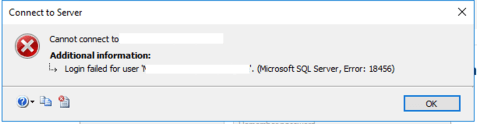
This blog post explains how to get into SQL Server if you have lost your sa password or you have no way of getting into your SQL Server instance.
This blog post is dedicated to the people who came along to my training course in Wellington 22nd February 2019…..
Issue:
During the course on “DevOps for the Database” – my 2nd instance on the training VMs was not setup for the training user. I did not have the sa password on me at the time and so I had to break into the instance…..
Resolution:
There are two methods you can do this:
the GUI
command line
Using the GUI:
First thing – stop the SQL Server Agent using configuration manager:
Stop the SQL Server Agent so we have exclusive use of SQL Server
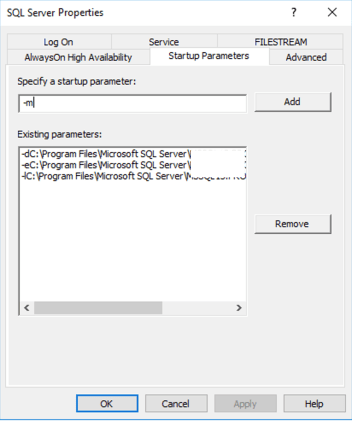
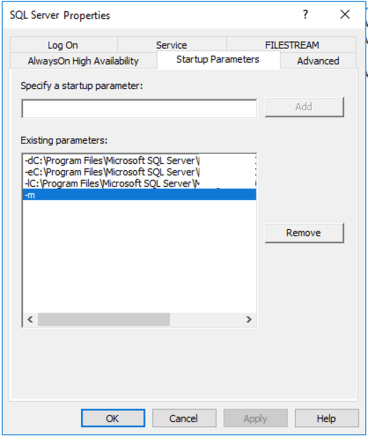
Now we want to stop the SQL Server instance and add the -m flag to it’s startup parameters:
Adding the -m switch to startup parametersThe -m switch is assigned to the SQL Server engine
We now start the service up and SQL Server will be in single user mode. You can now choose which methods to connect to the SQL Server instance.
Using the CommandLine to bring up SQL Server in Single User Mode:
These days it is way more preferable to write scripts for everything – and it’s a bit quicker to run the following commands.
For the example below the instance name is PROD.
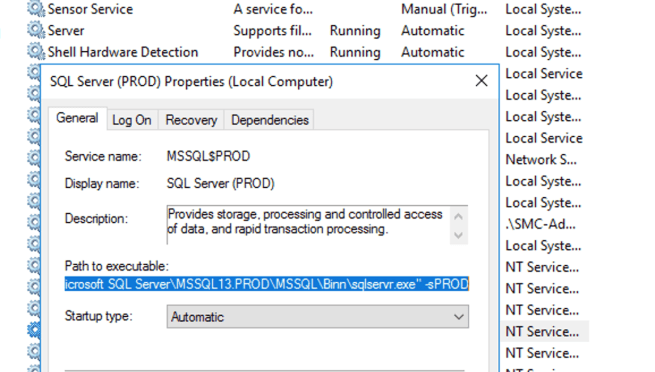
First – if you’re not sure where SQL Server is installed you can look at the properties of the instance via the services applet and see where the path to the executable is.
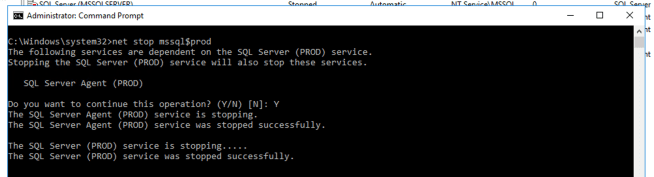
Seeing as you’re here you could actually stop the service!!
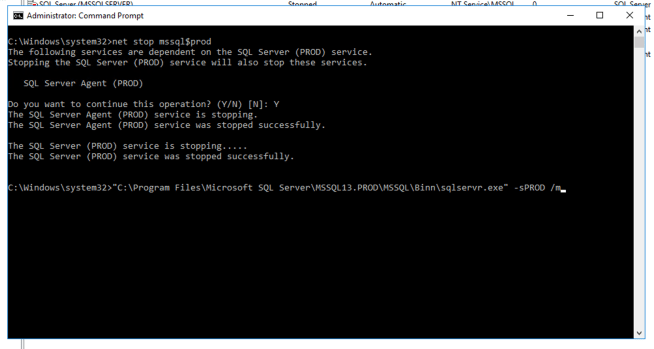
For the example above the executable that we want to put into an ADMIN command prompt is:
You will be prompted to stop SQL Server Agent – this is a good thing
You can now paste in the executable path from the services applet and add a /m to the end
Logging in:
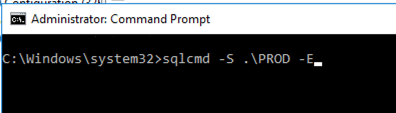
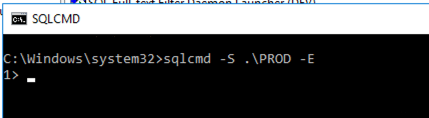
Regardless of which method you used to start SQL Server up in Single User mode you can now bring up another command prompt in Administrator mode and use SQLCMD to connect to the single user instance:
Connecting is very easyYou can now type T-SQL like normal
You have two methods of creating users – SQL Authentication or Windows Authentication.
Creating a SQL Authenticated User:
1.Connect to the master database in SQLCMD window:
USE MASTER
GO
2. Create a login called temp login (or whatever you want to call it)
CREATE LOGIN TempLogin WITH PASSWORD = '***********'
GO
(replace ******** with your password)
3. Add your user to SYSAdmin role:
ALTER SERVER ROLE sysadmin ADD MEMBER TempLogin
GO
You can now connect to your instance with SQL Authentication and your username/password from above and add your required user that could not login to your SQL Server instance.
Or change the sa password if required…
Creating a Windows Authenticated User:
1.Connect to the master database in SQLCMD window:
USE MASTER
GO
2. Create a login for your windows domain (i.e. my domain is called MyDOMAIN)
CREATE LOGIN [MyDOMAIN\Hamish] FROM WINDOWS;
GO
3. Add your user to SYSAdmin role:
ALTER SERVER ROLE sysadmin ADD MEMBER [MyDOMAIN\Hamish];
GO
You can now connect to your instance with Windows Authentication and and add your required user that could not login to your SQL Server instance.
Or change the sa password if required…
When you are happy that you can connect – remove your temporary login and if you used the GUI – stop the SQL Server instance and remove the -m flag from startup parameters and start up SQL Server.
This is a very quick way to essentially break into your SQL Server instance and create an admin account – obviously quite dangerous if you have RDP access to the server… so be careful who can access the server that hosts your SQL Server instances!!
Before you actually migrate your database you need to think about what changes to your application you may need to do.
Azure SQL Managed Instances do not utilise windows authentication – so your two methods of authenticating applications and users are:
SQL Authentication:This authentication method uses a username and password.
Azure Active Directory Authentication:This authentication method uses identities managed by Azure Active Directory and is supported for managed and integrated domains. Use Active Directory authentication (integrated security) whenever possible.
Azure Active Directory (AAD) logins are the Azure version of on-premises database logins that you are using in your on-premises SQL Server instances. AAD logins enables you to specify users and groups from your Azure Active Directory tenant as true instance-scoped principals, capable of performing any instance-level operation, including cross-database queries within the same Managed Instance.
Note: Azure AD logins and users are supported as a preview feature for Azure SQL Managed Instances.
A new syntax is introduced to create AAD logins, which utilises “FROM EXTERNAL PROVIDER” i.e.
CREATE LOGIN [hamish@morphit.onmicrosoft.com] FROM EXTERNAL PROVIDER
GO
compare this to our normal method of creating a login for a windows domain account
CREATE LOGIN [MorphiT\Hamish] FROM WINDOWS;
GO
One of the key things to understand with Azure SQL Managed Instances is that if you are
leveraging AAD for authentication then the SID for the server level login will not be
the same as on-premises. This will be a consideration when you are migrating your database and users from on-premises to Azure SQL Managed Instance.
Just like any database migration where SQL Authentication is used, you will need to handle the mismatch in SID between the database user and Instance Login.
This means that you may have to use ALTER USER to link the AAD login to the database user. Which in effect will link the database user to the server login.
You can also remove the user and re-add them in – however this is quite a destructive method and you will have no certainty that you will get the securables correct or as they were before you removed the user.
The biggest consideration is – will your application handle AAD – if not then you will have to use SQL Authentication.
If you decide to use SQL Authentication initially and then move to AAD then you will need to re-engineer your application to leverage AAD….
This blog post is one that I have had percolating in the background since around November 2018.
My good mate John Martin ( t ) was speaking at PASS Summit on Azure SQL Managed Instances and we had talked about use cases, some of the gotchas and things to consider when migrating your databases to it.
I have been discussing Managed Instances (MI) with more people recently and this blog post is basically a run down of what MI is and how you can migrate to it with some considerations.
The Past
Before we go into MI we should look at what the current offerings were in Azure before MI became available in 2018.
We already had Azure SQL Database (introduced in 2010) and also the ability to run up SQL Server on an Azure VM. Both of these offerings were attractive as:
Azure SQL Database:
Pros:
Server Administration is handled by Microsoft
You could scale out as required
Backups were fully managed
(BTW you can configure a long-term backup retention policy
to automatically retain backups in Azure blob storage for up to 10 years.)
Cons:
We don’t have SQL Server Agent
It’s running 24/7
Cross-database queries are not native
No control of files and filegroups
Can’t use native backups for restore
No Service Broker
Backups are fully managed (for control freaks like myself this can be an annoyance)
Note: Azure SQL Database comes in Singleton databases or Elastic Pools
SQL Server running an Azure VM:
Pros:
Good old familiar SQL Server
SQL Server Agent jobs!!
We can power down the VM if we do not require SQL Server 24/7
Cons:
We still have to administrate a server
The costs associated with hosting VMs in Azure
The management overhead of hosting VMs in Azure
Introducing Managed Instances:
Pros:
HA is built in
Infrastructure is handled by Azure
Can backup/restore to Azure Blob Storage
Lift & shift migrations
SQL Server Agent
Cross Database Queries
Linked Server (I know, I know….)
But like everything there are some cons.
Cons:
Commissioning the Managed Instance can take a fair while.
We can’t shut it down so cost can be prohibitive if you have scaled it wrong.
Azure SQL Database Managed Instance does not currently support long-term backup retention
Here is a good comparison of Managed Instance vs Azure SQL Database
A good comparison of Azure offerings for SQL Databases
Reference: “Azure Managed Instance your bridge to the cloud”, Joey D’Antoni, SQLSaturday Cambridge 2018
Requirements for Azure Managed Instances
Configuring network environment:
You need to configure the network environment where Managed instance will be created. You will need to create an Azure VNet and a subnet where the instance will be placed.
Although the VNet/subnet can be automatically configured when the instance is created, the only drawback is the fact that it will configure it with some default parameters that you cannot change later.
If you already have a VNet and subnet where you would like to deploy your Managed Instance, you would need to make sure that your VNet and subnet satisfy networking requirements.
Creating Managed Instance:
Once we have the network environment configured the Managed instaqnce can be created. The easiest method is to use the Azure portal, however you can use PowerShell, PowerShell with ARM template, or Azure CLI.
My recommendation is to script it out as that adheres to my philosophy of using Infrastructure as Code to do pretty much anything where possible.
Be careful though…
Storage is vital to the performance of your database:
You need to size your underlying disk with throughput in mind:
So if we want at least 5,000 IOPS per disk then we need to size at P30 or combine smaller disks to achieve the necessary IOPS.
Provisioned capacity and performance
When you provision a premium storage disk, unlike standard storage, you are guaranteed the capacity, IOPS, and throughput of that disk. For example, if you create a P50 disk, Azure provisions 4,095-GB storage capacity, 7,500 IOPS, and 250-MB/s throughput for that disk. Your application can use all or part of the capacity and performance.
Disk size
Azure maps the disk size (rounded up) to the nearest premium storage disk option, as specified in the table above. For example, a disk size of 100 GB is classified as a P10 option. It can perform up to 500 IOPS, with up to 100-MB/s throughput. Similarly, a disk of size 400 GB is classified as a P20. It can perform up to 2,300 IOPS, with 150-MB/s throughput.
Connecting to Managed Instance:
Essentially – Managed Instance is a private service placed on a private IP inside your VNet, so you cannot connect via public IPs.
You can connect to your Managed Instance in a variety of ways:
Create an Azure VM with installed SSMS and other apps that can be used to access your Managed Instance in a subnet within the same VNet where your Managed Instance is placed. The VM cannot be in the same subnet with your Managed Instances.
Setup Point-to-site connection on your computer that will enable you to “join” your computer to the VNet where Managed Instance is placed and use Managed Instance as any other SQL Server in your network.
Connect your local network using express route or site-to-site connection.
Validating your database before migration:
It is vital that you check that there are no differences between your SQL Server and Managed Instance. You need to understand what features you are using and whether you need to update your existing instance in order to migrate.
A good method is to install the Data Migration Assistant which will analyse the database on your SQL Server and alert you to any issue that could block the migration.
You also need to consider your authentication methods for your users and applications:
Native restore functionality that enables you to create a backup of your database, upload it to an Azure blob storage and RESTORE database from the blob storage. This is probably the faster approach for migration, but requires some downtime because your database cannot be used until you restore it on Managed Instance. You can even roll your own log shipping to it to minimise the amount of downtime.
Data Migration Service is a service that can migrate your database with minimal downtime. It does require vNet connectivity for source, VPN or Express Route to Azure.
Transactional Replication – this also minimises the amount of down-time and you can use a push subscriber model for Managed Instance
You can migrate up to 100 database on a single Managed Instance.
T-SQL Considerations:
There are some differences in T-SQL syntax and behaviour between Managed Instance and on-premises SQL Server.
So there you have it – Azure SQL Managed Instances are live – some might say that they are the future of SQL databases in Azure.
I personally think that like anything it has it’s place. For new cloud based apps that require a SQL database in Azure I’d probably still use Azure SQL Database but of course there is that good old saying:
In late December 2018 I had a discussion with Amanda Martin the PASS Community Manager around things that I would be doing in 2019. I thought I would share the questions we discussed, and my replies below.
What are your professional goals for 2019?
My professional goals for 2019 are based around what SQL Server 2019 will bring to the Data Platform. I am looking forward specifically to the changes around SQL Server on Linux – specifically the Red Hat Enterprise Linux based images.
See my blog post where I run up the Ubuntu images on CentOS:
I have clients who are heavily into containers and this has driven me to start promoting this within the community – to help others learn about what containerized SQL Server is all about.
Is there a technology you want to learn or master?
As mentioned above SQL Server 2019 is going to be a great release in terms of what it can offer people to extend their data platform.
This in itself will be a technology that I will be mastering in 2019 and I look forward to be able to back-fill that knowledge to our community.
A technology I am looking forward to learn and master in 2019 is Azure Kubernetes Service (AKS).
The reason for this is I have presented on how powerful the Azure platform can be. I am also educating my clients and community around containers so this is a great partnership of both technologies.
In 2018 an area that I have been working in a fair bit has been Availability Groups and the fact that SQL Server 2019 CTP 2.2 allows for running an AG on docker with Kubernetes is exciting.
Using containers as part of a DevOps deployment pipeline for databases and applications is an area that will grow and being at the forefront of that is a driver for me in 2019.
Do you have a skill you want to upgrade?
I speak on continuous improvement – around deploying quality value every time you release software.
A skill I want to “upgrade” is my speaking skills, I want to spend time honing my speaking craft. I want to continually improve how I deliver content to the community and industry.
Being able to deliver quality content that helps people learn is fundamental to why I get up in front of crowds and talk about how to #MakeStuffGo
In terms of technological skills I want to upgrade – I always want to be a better Data Professional and so this year will be spent reading blog posts, registering for some of the fantastic (and free!!) webinars that PASS run.
Our Data Platform is growing exponentially and so a fair chunk of my free time will be spent ensuring that the skills I have within it are relevant, current and transferable.
What are your PASS community goals for 2019?
My PASS community goals for 2019 are to be more involved. To extend my reach and influence within the community. I live in New Zealand which is quite a remote country – which is a good thing and sometimes a bad thing when it comes to travelling (anywhere).
I want to be able to reach the wider community and part of this will be where I do more webcasts as opposed to writing. Being able to run webinars is a great way to connect and share content with a fair wider and diverse audience.
Are you already involved with a PASS Local or Virtual Group? If so, do you want to get more involved in these speaking, organizing and coordination opportunities?
I am already a PASS Local User Group Leader in Christchurch, New Zealand. I run the SQL Server and Data Management User Group which has grown from 250 members to 745 members in 3 years under my leadership.
I have recently been involved in the “rebooted” DevOps Virtual Group with Rob Sewell (t | w) which has been a fantastic platform for us to get the DevOps message out to the world via the PASS VG platform. Rob is a very energetic guy and I think it’s gonna be brilliant working with a guy who is as bouncy as myself!!
It means that at least twice a month I am speaking, organizing and coordinating educational content to up-skill people – for free. That in itself is awesome and thanks PASS for all the support you give us UG/VG leaders.
Do you want to share more ideas and content with the PASS community through blogging or publishing video content?
I certainly do – 2018 has been a proving ground year for me. Over the past 3 years being involved with PASS I’ve grown my contributions within the community and the reason I’ve grown it is that it is rewarding to see the impact of what we all can do. 2019 I will be looking at how I can do more with web based sessions – so that a more diverse group of people can learn from both myself and others.
Collaboration is a key thing in how I work and also in my personal life and I am looking forward to seeing how I can work with others to increase our “touch points” within the industry to help people connect, learn and share.
I am also looking to collaborate with some people on writing a book to help people learn via another medium.
Do you want to get involved with or plan a SQLSaturday for your local PASS community?
I already organize a SQLSaturday – SQLSaturday South Island. This event has grown each year since I took it over in 2016 and it now boasts Australasia’s largest % of WIT speakers.
I want to further this and a goal for 2019 is to be a more inclusive and diverse community based event.
This is an exciting goal as I have never been one to stray away from goals or from encouraging people to be part of a community.
I am looking forward to collaborating with a whole range of people within both my local and extended network.
So there you have it – 4 days into the New Year and I’m excited about where 2019 will lead me – both from a technological, personal and community perspective.