Can I tune the tempDB of an Azure based SQL Server database…

Yip. You can.

I was originally going to write this post about tuning tempDB in our Azure SQL database. Which would be a very short post.

You can’t.

So I’ll write about tuning tempDB in your Azure based SQL Server database.

Why tempDB tuning? Well I consider it a valuable tool in our tuning toolbelt – in fact I’ve presented about it a couple of times at SQL Saturdays:

Sydney

Brisbane

As well as at my own User Group

So our SQL Server instance will be hosted on Azure Infrastructure as a Service (IaaS) utilising an Azure Virtual Machine. So in fact – most of the same database tuning methods and options will be applicable to SQL Server hosted here as you would for on-premises installations.

Firstly – you need to read this document which is extremely helpful in designing what your VMs and storage will look like:

https://docs.microsoft.com/en-us/azure/virtual-machines/windows/sql/virtual-machines-windows-portal-sql-server-provision

Same as with on-premises we are going to size our tempDB database file(s) appropriately – I like to presize mine and I typically will put one database file per CPU. Autogrowth is set to 100MB – but I typically will have done performance testing using the databases that will be hosted here to know what size tempDB files to put down.

A very important setting that will make a difference especially if you have restore a database or have to autogrow your files is:

Instance File Initialization (IFI)

This reduces the I/O required to create files and extend files, it is not enabled by default in Azure VM images.  You need to add your SQL Server service account to Perform Volume Maintenance Tasks security policy.

Some recommendations for IFI:

  • Configure IFI before creating database
  • Configure IFI first and then create & extend files for tempDB.
  • Configure IFI first before restoring any database on the new VM
  • Restart SQL Server service for the configuration manager after configuring IFI

The performance testing you will undertake for tempDB will utilise analysis of latch contention and rather than re-write something I’d prefer you went to the source:

https://www.sqlskills.com/blogs/paul/the-accidental-dba-day-27-of-30-troubleshooting-tempdb-contention/

http://www.sqlservercentral.com/blogs/robert_davis/2010/03/05/Breaking-Down-TempDB-Contention/

https://www.brentozar.com/archive/2014/05/tell-need-tempdb-files/

http://michaeljswart.com/2015/08/whats_going_on_inside_tempdb/

The articles above are really invaluable to help us analyse tempDB in our on-premises SQL Server installations – but they are just as applicable if you are running your SQL Server instance on a VM hosted in Azure.

So don’t let running in Azure fool you into everything will be OK – as you still need to tune tempDB (and other SQL Server metrics) but also – know that running in Azure there are a lot of things that you’ll get there (SSDs, scale, …) that you won’t get in on-premises.

By all means use IaaS for your SQL Server instance running on a Azure Vm – there are cases where you can’t just use Azure SQL. When you do you’ll find that performance might even be better than your on-premises SQL Server…

Yip.

How to grow the exposure of a Data Platform based conference (SQL Saturday South Island)

SQL Saturday conferences are awesome.

That is the opening line of this blog post – because it’s true and understated.

If you’re reading this and do not know what a SQL Saturday is – go visit http://www.sqlsaturday.com/ and find your nearest SQL Saturday. I’ve been lucky enough to have gone to a few as an attendee and now I go as a speaker around Australasia and Portland, Oregon.

The tl;dr of this can be found in the summary section – it’s a summary of how I found some ways to grow the attendance of my SQL Saturday.

Anyways, if you’re keen to read on:

My experience with SQL Saturday in Christchurch, NZ has been:

2013 Attendee

2014 Attendee, volunteer

2015 Attendee, volunteer, committee member

2016 Attendee, volunteer, speaker, co-organiser

2017 Attendee, volunteer, speaker, lead organiser

Martin Catherall (t | b ) had done a fantastic job of introducing SQL Saturday to Christchurch and in 2016 we worked together to make SQL Saturday Christchurch to become SQL Saturday South Island. Why South Island – well the fact is that New Zealand is small. Beautiful and awesome, but still small. Christchurch only has 366,000 people and all of the South Island — 1,096,200 people.

To grow our attendance numbers we had to include our ‘sister’ cities.

Thus SQL Saturday South Island was born in 2016 – this was also the FIRST year we hadn’t piggy backed off the local Code Camp Conference (which I am part of an awesome triumvirate with Steve Knutson (t | b)  & David Carter (t | w) ).

We had 123 attendees in 2016. This was honestly 22 more people than what I said to Martin that we had to achieve.

Fast forward (or rather catch up) to 2017. Martin very graciously let me take the lead on SQL Saturday South Island 2017 (#614) — mostly because he now lives in Melbourne, Australia — he moved there in October 2015.

My aim was 150 registrations. Which I thought was a ridiculous (for many reasons I never said this to Martin) number. The 123 registrations in 2016 was mostly because we were extremely lucky to have John Martin (t | b) from SentryOne come over. A speaker from the UK of John’s calibre will bring in a good crowd – and did.

For SQL Saturday you need a couple of things:

Venue

Speakers

Sponsors

Attendees

In my opinion that list is from easiest to hardest.

The venue is fairly easy because at worst – you pay for a venue. There’s always a venue…

I am now a speaker on the SQL Saturday ‘circuit’, so I know that I can promote how good Christchurch is to entice International speakers – and I did. I managed to get my SQL bro Nagaraj Venkatesan (t ) from Singapore to come over – I offered a room in my house to help him save costs. This guy is one of the most nicest guys we have in the speaker community – which is why I consider him a ‘bro’ (kiwi speak for brother).

Sponsors – a little trickier as there is only a finite amount of money to go around and NZ’s population size is 4.5 million. Only slightly larger than Sydney or Melbourne Australia. As mentioned Christchurch is tiny compared to the bigger cities that do SQL Saturday in Australasia. So far I’ve never had a sponsor say no that we’ve approached and we’ve also been lucky to have some approach us. I love numbers so I always talk about how our SQL Saturday has grown over the years – as well as the SQL Server User Group I run that grew from 20 users in 2013 to 458 in 2017. Why mention the User Group? — well it’s going to feed the SQL Saturday with people.

Sponsors love people.

I’m lucky/blessed/fortunate that Jade Software – the company that employs me has been generous to us over the years and has supported us greatly.

(Thank you Caroline Francis our Director of Marketing for always reading my emails that contain lots of numbers and heaps of enthusiasm…

… and agreeing to help us out with X, Y and Z)

Which after this long intro – leads me to the point of this blog – how to get more attendees along to SQL Saturday or any Data Platform conference.

Marketing the conference requires getting the information out to the masses.

Because I was locally based I took this as my responsibility.

I offered to speak at as many local User Groups that were applicable (I really can’t write/do java so had to scrub that UG off my list).

After each presentation I had a slide or the website that I quickly talked about SQL Saturday South Island. When I took over the SQL Server User Group in October 2015 one thing I decided to bring to it was collaborative community — I invited all the User group leaders and their respective groups to Christmas Drinks – and started the idea of cross-talks. I’d speak at the .NET UG about data – the .NET speakers could speak at my UG about accessing data. I even had the Agile Group join my group for a session from RayGun.

(If you haven’t looked at RayGun and you do any form of development – you need to)

So this collaborative community meant that instead of just my own User Group attendees I now had a far greater reach. I emailed a lot of User Group leaders and asked them to email their groups about SQL Saturday (I wrote the text that they could just copy|paste – vitally important that you make it easy…!!).

I lecture at a local university – 3 times a year – however my first lecture was in May.

So I drove in one Monday morning in my own time and spoke to the class – I had the slides promoting topics (Machine Learning, Cognitive Analysis, SQL injections)  and website and got my SQL Saturday registration site listed on their internal intranet.

We run tech events in Christchurch – I went to a number of applicable ones, because I’ve spoken at a few – I approached the people in charge of mail outs and gave them information that they could put out to their mailing lists here in Christchurch (again make it simple for them – copy|paste for them takes 5 seconds!!).

I asked my mates on the Twitter to retweet anything I put up about #sqlsat614 I even asked people who use Facebook to promote us. I don’t use Facebook like normal people so my reach there was very limited.

A special mention goes to Nick Draper (t ) – one of my User Group committee members and who has been co-running it since it began officially in March 2013. Nick used his own network of people within Microsoft and the Christchurch IT community to help promote the event. It is people like Nick and everyone I mention in this post who make a HUGE difference and make my job so much easier.

I used LinkedIn as a method of getting the message of a FREE conference that will help you learn as a way of getting interest. I used my own network to like/comment/share/write their own pieces. I made sure the words “free education event” were included. Where people wrote on LinkedIn I purposely did NOT give them text to write – this was a personal writing and if they chose to support me then I’d rather it were their words. Plus I take 2,183 words whereas others take 200 words to get a message across…

Because I co-run Code Camp as well – it meant I had (limited) access to email addresses. So I signed up with mail chimp and sent a nice email to 284 people who had attended in the past 4 years (I only sent one email out as I felt quite ‘spammy‘ doing it – even though it was for a good cause).

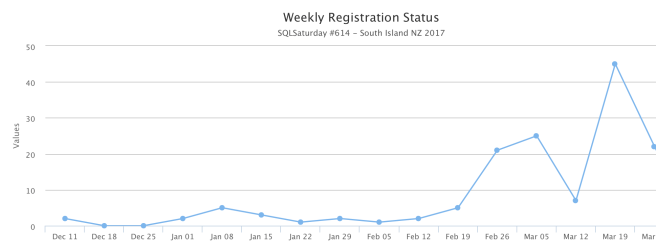
I also TIMED all of the above events so that we started small with one thing, then hit the population with another social media interaction. I did not want to over saturate and anger my audience with spam. By drip feeding over 6 weeks I watched the numbers rise:
Screen Shot 2017-04-01 at 15.24.45

I had done some initial “coming soon” announcements in early January which is why there were some initial registrations then.

Timing is vitally important here – announce too soon and people forget – announce too late and people have plans. It is on a Saturday after all.

Saturday’s are important to our industry – it is the day where we can (hopefully) relax, associate with friends, spend time with family.

I’ve found getting the message out there about 3 months out – just a ‘hey we’re gonna be on this date more news soon’ type of announcement works well. 6-8 weeks out and you’ve got your speakers lined up, you’ve got a venue and you know if you can supply a free lunch and/or something afterwards. Sponsors are truly valuable for allowing us to exist and do things.

I don’t want SQL Saturday South Island to be all flashy, with heaps of shiny things – that isn’t the New Zealand way for one thing and my budget is just right that I know I can put this on at a big enough venue, that people will learn something and there’ll be a free lunch and the possibility of a free beer and pizza afterwards.

Oh yeah – let’s quickly talk about something that is a game changer:

Volunteers

I’ve been one, I still am one and without them — we’d be a mess.

Last year when I took over as co-organiser I let my inner Operations Manager take over and made volunteers an official part of SQL Saturday South Island. Beforehand it’d been mostly informal and it mostly worked.

By making it official in 2016, (2017 is the first year we’ve used the SQL Saturday volunteer portal and I really wish we had earlier) it meant that I knew how many people would help us on the registration table, how many people would help clean up afterwards. Which allowed me to plan and also know how many small thank you gifts I would buy to say a huge thank you to the unsung heroes of SQL Saturday South Island.

Summary

In short these are the things that helped grow SQL Saturday South Island:

  1. Growing a community locally amongst User Group leaders – SQL Saturdays (or at least mine) are a combination of DEV, DBA, OPs people. This means that the structure of my SQL Saturday will appeal to
    1. .NET developers
    2. DBAs
    3. Data Scientists
    4. Operations folk who spin up resources.Collaboration goes both ways –  I spoke at a lot of local UGs and invited the leaders of them to send speakers my way.
  2. Local Universities – if you aren’t already – reach out to local universities to:
    1. teach students about the real world – even just for an hour
    2. invite said students to come along and learn from the masters of our industry
  3. Local Tech Events – same thing – go along, speak, support them because:
    1. you’ve now extended your User Group reach to 100s more professionals
    2. you’ll network with a few more professionals and learn from them
    3. they’ll assist you in communicating to their members about SQL Saturday
  4. Twitter – #sqlpass , #sqlsaturday , #sqlsat , #sqlfamily means:
    1. you’ll get exposure of your event for speakers/sponsors/attendees
    2. others who care (and there are a lot who do) will retweet to their networks
    3. it gives you a chance to work on your own brand (that’s another post….)
  5. LinkedIn – be careful – this is a professional network and you want to make sure that you’re not over-saturating your network with spam. This was the one area where I let people write their own words. In other areas I provided text to make it easy for people.
  6. MailChimp – as above – you need to be wary of just spamming your intended audience. I had 62% click rate on my mail out (notice I didn’t write mail outs there). This was primarily an announcement – I timed it for 6 weeks out and left it at that.
  7. Friends in the industry – one of my User Group committee members works in recruitment.  I provided some text and she re-wrote (shortened) it and sent it out to her own mail list. My other industry friends reached out to their contacts i.e. Microsoft to publicise our event via (say) MSDN mail outs.
    Even people as far away as Brisbane can help via Social Media like a historical supporter of SQL Saturday South Island  – Warwick Rudd (t | b |w)
  8. That time at a BBQ….. I was at a mates BBQ and (randomly) starting talking about Power BI, a person there actually worked in IT and was interested in learning from Reza Rad (t | b) (he knew of RR but didn’t know of the upcoming SQL Saturday!!). He registered the next day and event registered for Reza’s precon. Basically talk a lot about your event – because your event is AWESOME.

This blog is about growing numbers – we are now at our venue limit of 150 people. My ridiculous number actually came about.

[Update 25th April 2017: Read my post about how well it actually went here]

Vitally important – our number of volunteers grew from 2 of us back in the 2014 to 12 people in 2017.

So SQL Saturday South Island is next weekend on 8th April, I’m really looking forward to it – to see some of my fellow speakers, to learn some things and more importantly to help all the people I’ve been communicating about it over the past 2 months:

connect, share and learn

Yip.
Answer to “Could not locate file ‘xxx_Log’ for database ‘xxx’ in sys.database_files”

This blog post is a form of resolution to the issue of not being able to shrink a transaction log after a FULL backup where you this error:

Could not locate file ‘xxx_Log’ for database ‘xxx’ in sys.database_files

Its funny how peculiar issues decide to crop up on a Friday afternoon…

…just as you’re about to go home.

Long story short a client’s database transaction log kept growing and they couldn’t truncate it and they needed it to be shrunk. So I was asked to assist.


My quick and dirty method was to shrink the 500GB file down to 1GB:

USE [master]
GO
ALTER DATABASE [clientTdatawarehouse] SET RECOVERY SIMPLE WITH NO_WAIT
GO
USE [clientTdatawarehouse]
GO
DBCC SHRINKFILE (clientTDataWarehouse_log, 1024)
GO
USE [master]
GO
ALTER DATABASE [clientTdatawarehouse] SET RECOVERY FULL WITH NO_WAIT
GO

However I got this error:

Msg 8985, Level 16, State 1, Line 1
Could not locate file ‘clientTDataWarehouse_log’ for database ‘clientTdatawarehouse’ in sys.database_files. The file either does not exist, or was dropped.

Hmmmm……

So I ran

use [clientTdatawarehouse]
SELECT name FROM sys.database_files

I also ran

use [clientTdatawarehouse]
exec sp_helpfile

And both times got back what I’d expect:

name
clientTDataWarehouse
clientTDataWarehouse_log

But no matter how I copied and pasted it into the original query – I still got the error.

I tried everything listed here:

http://dba.stackexchange.com/questions/43932/dbcc-shrinkfile-works-with-file-id-but-not-with-logical-name

and

http://stackoverflow.com/questions/12644312/could-not-locate-file-mydatabase-for-database-mydatabase-in-sys-database

But still got the weird error.

This was a database that COULD back itself up normally – both bak and trn type backup..!!

(the reason I got called in was because the log and backup drive was very full — because the transaction log kept growing and they couldn’t shrink it and….)

So I decided to clear some disk space, do a backup and then tried this:

USE [clientTdatawarehouse];
ALTER DATABASE clientTdatawarehouse MODIFY FILE
(NAME = clientTdatawarehouse _log, NEWNAME = clientTdatawarehouse_log_1);

It worked in the rename part and now for the shrink part.

Original script slightly modified:

USE [master]
GO
ALTER DATABASE [clientTdatawarehouse] SET RECOVERY SIMPLE WITH NO_WAIT
GO
USE [clientTdatawarehouse]
GO
DBCC SHRINKFILE (clientTDataWarehouse_log_1, 1024)
GO
USE [master]
GO
ALTER DATABASE [clientTdatawarehouse] SET RECOVERY FULL WITH NO_WAIT
GO

It worked!!

Renaming the logical name back to the original also worked and I could shrink the transaction log. BTW I should state the shrinking transaction logs is not a good thing but this client does it (for reasons)  – oh well.

As to why SQL Server had forgotten what the name is – that is my weekends project of diagnosing it. For now – the database can be backed up, the client is happy and my Friday is now my own…

..after going back and contributing back to the community by updating the two sites I initially looked at.

Yip.

Having OCD in Azure…

Everyone gives OCD a hard time. When in fact it is something to embrace.

I am of course talking about Operational Continuous Delivery.

This is where we in Operations can do some of the awesome stuff that Developers have been doing for years with Continuous Delivery. That site BTW is one of the better sites I’ve read about what CD is all about.

Azure really helps us have OCD and achieve greatness.

How?

Well first of all Azure is built on Continuous Delivery (DevOPs) principles.

Example – use Azure SQL?

That is deployed to every 3-4 weeks as part of agile processes. Gone are the days where you wait a year or more for new features. Microsoft have embraced DevOPs and this has meant that new features are rolled out to Azure as part of the “Cloud First” direction they have taken.

What this means is that for new shiny resources I will be looking first to Azure.

What this means is that to achieve the efficient management of those resources I need to also adhere to the all the standards and iterative processes that help make things go (efficiently).

In fact I’ve written about it in my post about standards – so what do we need to do to achieve the same in Azure (or any cloud service provider for that matter…) to achieve Operational Continuous Delivery?

Firstly the Continuous Delivery part of this is being able to reliably, repeatably deploy resources & apps in an automated fashion.

Quickly. Iteratively. Safely.

We can transfer some of the good stuff we have with Continuous Delivery into Azure. Having a standard setup means that we can now deploy things automatically in Azure that we couldn’t perhaps do as quickly on-premises.

The Operational part is about encompassing Continuous Delivery for all resources – whether they are servers, databases, applications, users, storage or Azure Functions.. Which is why this is the blog of the Hybrid DBA and not the blog of the DBA. Operations over-arches all things – whether it is a web app being deployed, a SAN being configured or a change to a database schema(using SSDT).

Let’s look at an example of a Virtual Server residing in Azure that has an Azure SQL database:

ClientPortal_Azure_OCD

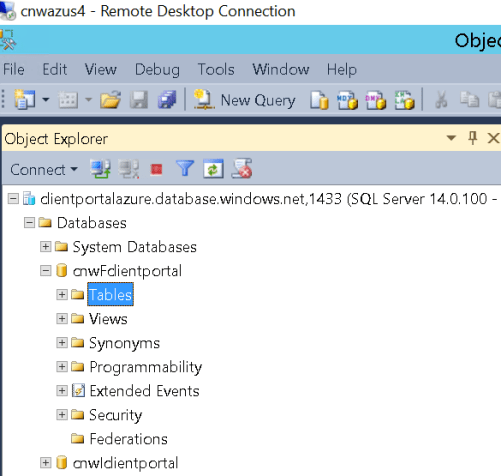
So our server CNWAZUS4 (the 4th server in Azure for the client known as CNW) is connecting to the Functional Test database for the Client Portal application.

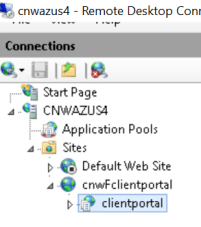
On the server in question we have IIS setup like this:

ClientPortal_Azure_OCD
Website in IIS


ClientPortal_Azure_OCD
Application pools in IIS

In the above pictures we have the user cnwFclientportal assigned to the cnwFclientportal_portal application pool which resides in the cnwFclientportal website and has an application called client portal. These connect to a database called cnwFclientportal in the Azure SQL instance known as ClientPortalAzure.

ALL of the above resources were not created by a human.

This means that when we want to spin up the Integration database (cnwIclientportal) all we will do is pass a new parameter to our Azure Automation scripts and we let the machines do the boring (but standard) work.

We can do this in seconds, we can do this reliably, we can do this repeatably and it is automated.

Azure really helps us do this by use of all the templates available to us. We can now deploy servers, databases, apps, users all at the push of a “button”. We can make iterative changes and know that things will work as we have a standard setup and a standard deployment process.

Thus we truly do have OCD….

…Yip.

I like data – so Azure SQL is (initially) my focus..

My journey with Azure has been around what it can do for me – and the company I work for (Jade Software). I’ve been doing databases for almost 20 years (I feel old writing that).

I’ve interacted with data in many shapes and forms, from

— text files generated from Visual FoxPro that held sheep pelt sizes in 1996 to

— running massive amounts of data in Azure for a NZ utility company to

— Machine Learning…

BTW if you haven’t already – you need to take advantage of the free trial offering from Microsoft Azure. I’ve used the free trial for testing out certain things – it is very easy to set up and most of it is the defaults.

Head along to https://azure.microsoft.com/en-us/free/  and try it today (it’s free!!).

So my journey with Azure is based around the end result of using Cortana Analytics and Machine Learning to make a difference with data. Because I’m about the data.

And servers – I have come from an infrastructure background — which is invaluable if you want to make databases go faster….

But let’s start with the basics first and stay on track about databases — last post we made a database in Azure (hooray) using Azure CLI on a Mac (double hooray).

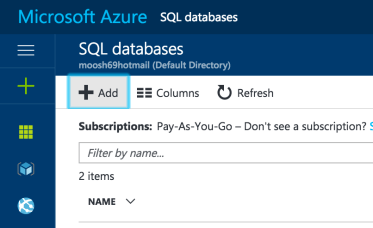
It is just as easy, maybe easier, to set things up in the portal. So log into https://portal.azure.com – go to the SQL databases icon

Screen Shot 2017-03-22 at 21.18.13

And then we want to ADD a new database

Screen Shot 2017-03-22 at 21.17.37

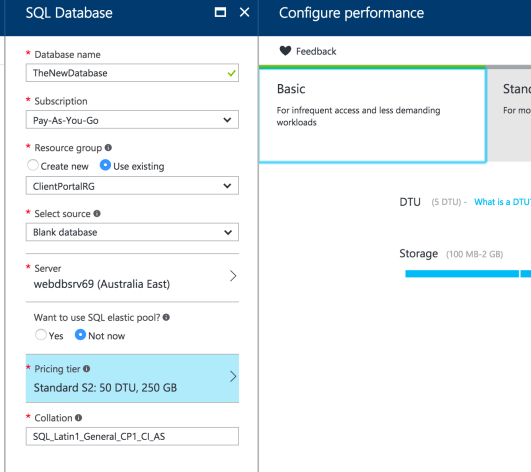
We’re now going to choose some options – in this example I already have the following:

Resource Group (ClientPortalRG)

Server (webdbsrv69)

Location (Australia East)

Pricing Tier (which I am changing from S2 down to Basic)

As shown here:

Screen Shot 2017-03-22 at 21.21.16

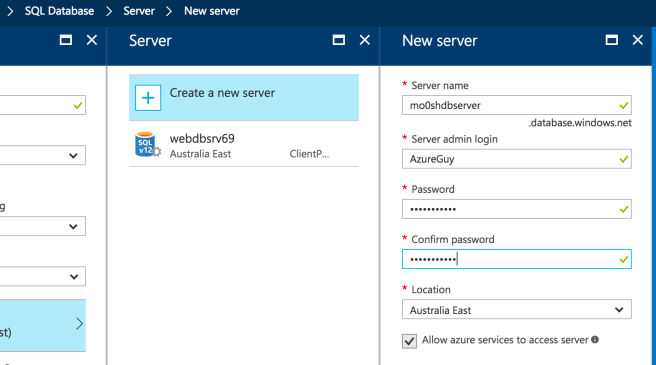
Let’s say I needed a new server – that is simple as – in the portal I’ll choose “Create a New Server” as shown here:

Screen Shot 2017-03-22 at 21.23.55

Which takes about 10 seconds to input the settings and about 1 minute to have ready and going. In NZ colloquial terms that is “sweet as”.

I have come at this from a database first perspective – but I could have created the server first and provisioned it. I like the fact that I have options for how I create resources.

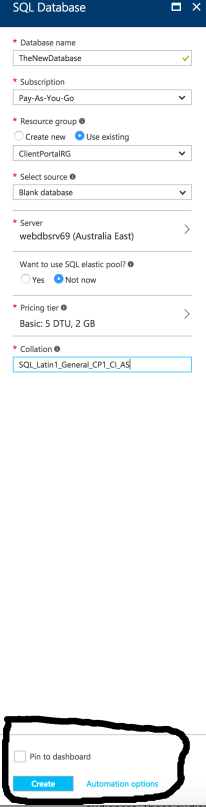
OK, lastly – we have the three almost mot important parts of the setup at the bottom of the screen:

Screen Shot 2017-03-22 at 21.29.46

We can pin the about to be created database to our dashboard, we can create it (quite important) but we can also use automation options.

I’m an automation type guy so the automation part is really important to me and is the basis of another more in-depth post. I’ll probably use the words “continuous delivery” and “Infrastructure as Code” when describing the brilliance of Automation Options in Azure.

Yip.


Using Azure CLI to do stuff….

For this post I am going to talk about one of the methods I use to  manage my Azure resources.

The prime driver for this is what I call “Infrastructure as Code +”. In my previous blog post “How Azure can assist the deployment of our applications” I talk about how awesome Infrastructure as Code is. Using PowerShell to spin things up and control/manage them is great – but the Azure platform takes things next level.

Because I can now truly spin up resources in seconds where doing things On-Premises (even in a virtual setting) can still take a little time. Sure I can push a button and walk away know it will be a declarative, standard and automated deploy of infrastructure – but it still takes longer than anything I can do in Azure.

At work I’m a windows guy, at home I run MacOS (it’s a long story – buy me a beer one day and I’ll tell you). I also run some Linux stuff but that is an even longer story…

So one of the first things I did when I was mucking about with Azure was install the Azure PowerShell SDK on my work laptops and then install the Azure CLI on my home Mac.

So I visited https://azure.microsoft.com/en-us/downloads/ to get everything I needed and followed the instructions in https://docs.microsoft.com/en-us/cli/azure/install-azure-cli

Because there are so many articles written on the internet around Azure PowerShell on windows I am going to show how I do things using the Azure CLI on Mac.

So I ran:

curl -L https://aka.ms/InstallAzureCli | bash

You just go with the defaults.

On the Mac I am running:

HamishWatson$ azure –version
0.10.8 (node: 4.7.0)

The install was very painless – as most things in the *nix are (most of the time until that time they aren’t and then it hurts real bad and you google a lot and read a lot of BBS..)

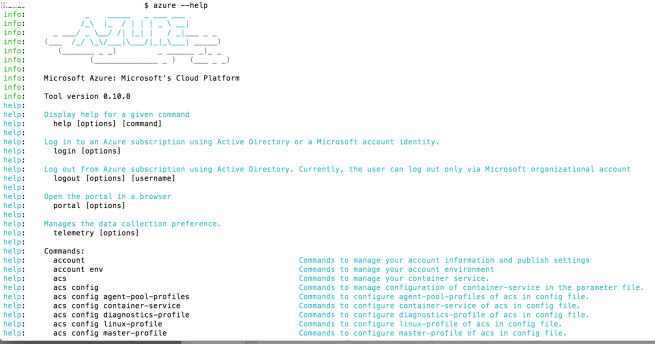
The cool thing is I forget a command I can easily get help by typing:

HamishWatson$ azure –help

Screen Shot 2017-03-21 at 21.42.16

One of the first things I did was connect to my existing Azure portal subscription.  Which was fairly simple:

HamishWatson$ azure login
info:    Executing command login
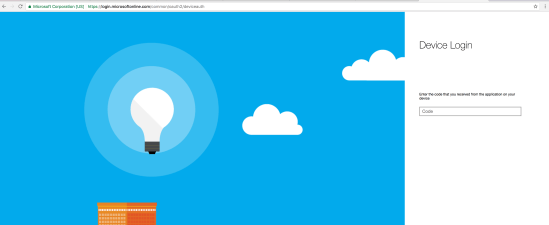
info:    To sign in, use a web browser to open the page https://aka.ms/devicelogin and enter the code GTYAL666U69 to authenticate.

Screen Shot 2017-03-21 at 21.27.09

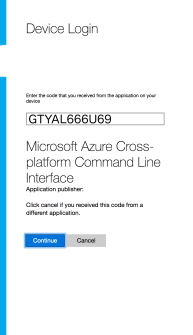
And then enter in the code:

Screen Shot 2017-03-21 at 21.30.04

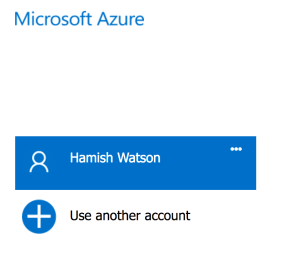
And choose the right account to access Azure:

Screen Shot 2017-03-21 at 21.39.50

Which then links your terminal session with your Azure Portal session.

We can now do some familiar tasks like list our resources:

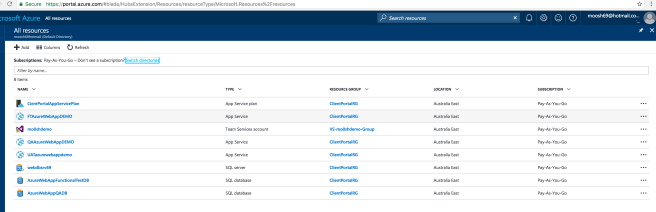
Screen Shot 2017-03-21 at 21.45.04

Which looks quite familiar:

Screen Shot 2017-03-21 at 21.47.33

Listing resources is one thing but MAKING resources (and ultimately stuff go) is the goal here.

And this is where things got a little weird.

You can use azure or az. Most scripts use az so you need to ensure that you have it installed properly.

The az application resides in  /Users/<your username>/bin/ so make sure you update the $PATH with that.

So doing some of the above:

bash-3.2$  az –version
azure-cli (2.0.1)

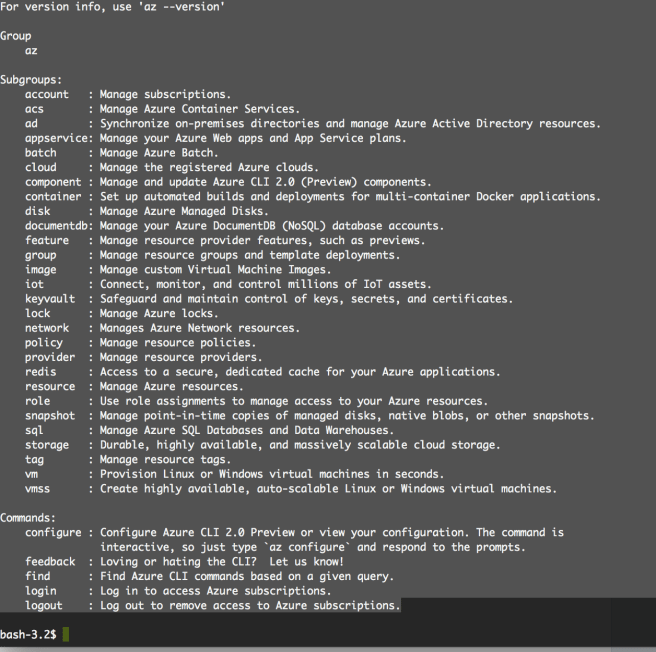
Remember the help from above – here it is using az:

Screen Shot 2017-03-21 at 22.55.50

So as you can see – az is very powerful for allowing us to create things – many things.

I’m a database guy so I want to do stuff with the sql command above.

At any step of the wayI can get some help.

So for the sql subgroup:

bash-3.2$  az sql –help
Group
    az sql: Manage Azure SQL Databases and Data Warehouses.
Subgroups:
    db          : Manage databases.
    dw          : Manage data warehouses.
    elastic-pool: Manage elastic pools. An elastic pool is an allocation of CPU, IO, and memory resources. Databases inside the pool share these resources.
   server      : Manage servers. Servers contain databases, data warehouses, and elastic pools.

And for help about the database part:

bash-3.2$  az sql db –help
Group
    az sql db: Manage databases.
Subgroups:
    replica: Manage replication between databases.
Commands:
    copy   : Creates a copy of an existing database.
    create : Creates a database.
    delete : Deletes a database or data warehouse.
    list   : Lists all databases and data warehouses in a server, or all databases in an elastic pool.
    restore: Creates a new database by restoring from a database backup.
    show   : Gets a database or data warehouse.
    update : Updates a database.

And lastly – to create a database and I’m not sure of the command:

bash-3.2$  az sql db create –help
Command
    az sql db create: Creates a database.
Arguments
    –name -n           [Required]: Name of the Azure SQL Database.
    –resource-group -g [Required]: Name of resource group. You can configure the default group using ‘az configure –defaults group=’.
    –server -s         [Required]: Name of the Azure SQL server.
    –collation                   : The collation of the database. If createMode is not Default, this value is ignored.
    –edition                     : The edition of the database.
    –elastic-pool                : The name of the elastic pool the database is in. If                               elasticPoolName and requestedServiceObjectiveName are both updated, the value of requestedServiceObjectiveName is ignored.
    –max-size                    : The max storage size of the database. Only the following sizes are supported (in addition to limitations being placed on each edition): 100MB, 500MB, 1GB, 5GB, 10GB, 20GB, 30GB, 150GB, 200GB, 500GB. If no unit is specified, defaults to bytes (B).
    –sample-name                 : Indicates the name of the sample schema to apply when creating this database. If createMode is not Default, this value is ignored.
    –service-objective           : The name of the configured service level objective of the database. This is the service level objective that is in the process of being applied to the database. Once successfully updated, it will match the value of serviceLevelObjective property.
    –tags                        : Resource tags.
Global Arguments
    –debug                       : Increase logging verbosity to show all debug logs.
    –help -h                     : Show this help message and exit.
    –output -o                   : Output format.  Allowed values: json, jsonc, table, tsv. Default: json.
    –query                       : JMESPath query string. See http://jmespath.org/ for more information and examples.
    –verbose                     : Increase logging verbosity. Use –debug for full debug logs.

Through the use of JSON we can build up a template (or use one of the Azure ones and edit for our own usage).

So to create a database on our existing server – what existing server you ask?

Well let’s find it:

bash-3.2$ az sql server list –resource-group ClientPortalRG
[
  {
    “administratorLogin”: “azuremanager”,
    “administratorLoginPassword”: null,
    “externalAdministratorLogin”: null,
    “externalAdministratorSid”: null,
    “fullyQualifiedDomainName”: “webdbsrv69.database.windows.net”,
    “id”: “/subscriptions/5c4fc285-ddba-4280-93cf-3a965cbce836/resourceGroups/ClientPortalRG/providers/Microsoft.Sql/servers/webdbsrv69”,
    “kind”: “v12.0”,
    “location”: “Australia East”,
    “name”: “webdbsrv69”,
    “resourceGroup”: “ClientPortalRG”,
    “state”: “Ready”,
    “tags”: null,
    “type”: “Microsoft.Sql/servers”,
    “version”: “12.0”
  }
]

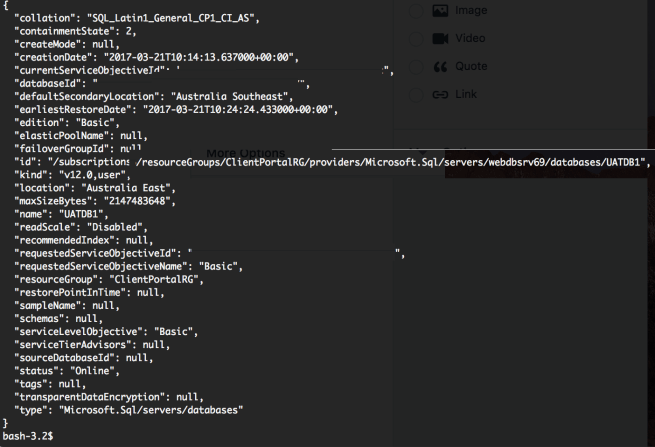
So now let’s create a database called UATDB1 in the Basic Edition (as I don’t want to pay much for it per month):

az sql db create –name UATDB1 –resource-group ClientPortalRG –server $servername –edition Basic

Within about 20 seconds we now have a new database – from the CLI:

Screen Shot 2017-03-21 at 23.15.11

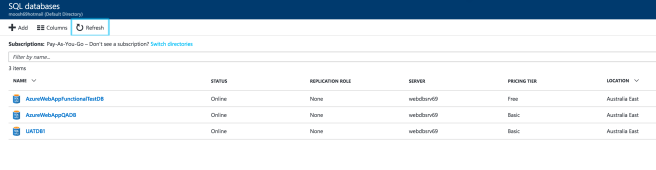
And we can see it in the Azure Portal:

Screen Shot 2017-03-21 at 23.19.02

So there we have it – how to create an Azure SQL database from the Azure CLI on a Mac…

Yip.

“DevOps in the Wild” – an Australasian Road Trip

I was lucky enough to be chosen to speak at Ignite Australia in February this year. This was huge – mostly because in Microsoft circles I’m fairly unknown – whereas within the PASS and SQL Saturday community I’m getting known as the DBA/OPs guy who preaches that DevOps thing.

My tagline for getting up in front of people is:

If I can inspire just one person in the audience to make a change – then this is worth it“.

Ignite was always going to be huge as it was going to one of four conferences I was going to speak at within 10 days. Hence the title – this was a road trip of sorts where I got to speak about a topic that I hope can help people make positive change in their businesses.

The others were:

The big one of course being Ignite Australia.

Here is the crowd who wanted to hear me talk:

c4q3zl8ueaaho9g
Ignite Australia 2017 – “Making DevOps work in the Wild”

All the sessions has one common theme – how to make DevOps work for you and your company.  Ignite Australia was about an overall “How to make DevOps work in the wild” view whereas SQL Saturday Sydney (for example) was more about “How DBAs can/should embrace DevOps”. All my sessions have DEMOs associated with them.

For Ignite I wanted to show the whole journey of making changes and showing those flow through various tools and also environment setups.

For Difinity and SQL Saturday Sydney I wanted to drill down into particular parts of Continuous Delivery – specifically the use of SQL Server Data Tools and DACPACs – the common theme was integrating the delivery process with Azure and Continuous Integration tools like Team Foundation Server (TFS) and Visual Studio Team Services (VSTS).

If you’re interested here is my session on Channel 9 (75 minutes):

https://channel9.msdn.com/events/Ignite/Australia-2017/CLD323a

I was also lucky enough to be interviewed by Adam Cogan (t | b) from SSW which was an awesome experience.

You can watch the interview (13 minutes)here:

https://youtu.be/gYapE4Gx_uo

Before I went on the roadtrip I was asked if I would do a podcast with CIAOPS and you can hear it (26 minutes) here:

http://ciaops.podbean.com/e/episode-138-hamish-watson/

All in all the experience of speaking at Ignite Australia was amazing, I really enjoyed meeting fellow speakers and also going along to some great sessions.

I’ve been speaking for roughly 2.5 years now and I always like to retrospectively analyse how my sessions went. My evaluations for Ignite were pretty good – as a speaker I got 4.1 out of 5 which I am happy with.

The comments were interesting – DevOps is a subject that polarises people and I’ve found that I’ll either have lovers or haters who decide to fill out evaluation forms. Ignite was no different and I’m glad for all the comments as I want to grow as a speaker and every time I speak I learn something new about my technique and also something to improve.

I preach about continuous improvement both within my workplace and in front of crowds so it makes sense that I reflect on how I could have improved.

I am going to choose Ignite as this was the largest group of people I’ve spoken to on this subject. About twice the size of the group of people I spoke to at PASS Summit in 2016:

http://www.pass.org/summit/2016/Sessions/Details.aspx?sid=47521

Areas for improvement:

1. I should have made it a 200 level session.

Initially I wanted to go in depth into Continuous Integration feeding into Continuous Delivery. I had a fairly good in depth DEMO that would show this. However I was worried about time and cut back my DEMOs which involved a lot of material that would have made this a 300 level session. I was also worried I’d lose some of the audience if I focused wholly on the technology rather than what actually makes DevOps work in the wild.

What actually makes DevOps work in the wild you might ask?

Watch the session.

But yeah – lessson learned – I should have contacted the organisers and said “hey thanks for picking my session, however in retrospect it’s a 200 level session”.

2. Recorded DEMOs are an art…

Part of the speaker briefing was that Ignite recommended doing recorded DEMOs. Which I could see the merit in – imagine doing an Azure DEMO and the internet drops out. Or your DEMO completely breaks – Ignite don’t want a room full of people twiddling their thumbs whilst the speaker freaks out.

I love to do DEMOs that are LIVE. Because it is risky and more importantly when things go wrong (trust me there is no “if” there) then the audience can go on a journey with you to work out what broke. I have always recorded my DEMOs – as a backup – just in case something does ever go wrong – but I’ve never (yet) had to use them.

So I recorded my DEMOs and then I re-recorded them and changed bits and got them to a point where I thought I was happy. I practised with them, alone and in front of people.

However on the day in front of a crowd of 200+ people – I felt a little disjointed and my DEMOs were a little too fast in hindsight.

They were a little too broad as well, I should have delved into one thing and really done a deep dive – to warrant the session being a 300 level session. In a 200 level session the DEMO I did would have been fine.

Another lesson to be learned – if recording the DEMO – slow it down rather than speed it up and practise it in a variety of stances (as the monitors might be over there or over here etc.).

3. Warm up with the crowd – regardless of size

Before any of my sessions I engage with the crowd. I like to find someone to talk to then extend it out to the mass that is the crowd.. Even at PASS where my audience was over a 100 people I still engaged with them, mostly talking about NZ chocolate..

The reason I do this is that I get into my style quicker and I don’t need to warm up during the first 3 slides.

Ignite I didn’t do this as I was waiting for the room to fill, the technicians to say “yip, you’re on”…

…and when I listened to my session this week I could tell – I use “uhm” or “ahh” when I’m warming up. I should have engaged with the crowd- I was in the room for 30 minutes before my session so I had time.

Summary

As mentioned speaking at Ignite was a wonderful opportunity for me – I feel extremely lucky to have presented. DevOps is a topic that people either don’t understand, over complicate or just plain hate. I’m not going to change the haters but I certainly want to help the people that don’t understand or want to make a positive change in their application life cycle and deployment pipeline.

I learnt some things speaking at Ignite which will help me in future presentations and that is worthy of the time spent preparing, speaking and evaluating myself.

Yip.

VIDEO: Helping others understand Azure and how it can help with DevOPs stuff

For the past 2 years I have been on a crusade of giving back to the community. For so many years I’ve consumed blogs, watched webinars and attended SQL Saturdays to learn things. I’m now at that stage in my career I want to give back.

Not because I’m the best in the field – that was what was holding me back – because I felt I had nothing to offer. I was so wrong.

I realised that I had the potential to talk about a topic that I’ve researched for weeks, months and years and that in the audience might be one person who didn’t know what I now know.

So in 2016 I submitted for every SQL Saturday in Australasia that I was available for and was lucky enough to speak at the PASS Summit in October 2016 – “Overcoming a Culture of FearOps by Adopting DevOps“.

Whilst speaking on tempDB at SQL Saturday Brisbane I met someone who was totally committed to community education – Nagaraj Venkatesan (t / b) and over the past 6 months we talk regularly via social media.

Nagaraj has setup a channel on YouTube and I was very honoured when he asked me if I would be one of his first interviews on it. The video below is 30 minutes long and after watching it a few times I realise that when I’m excited about a topic – you can definitely tell I’m excited about a topic….

Video at SQL Server Central

Yip.


How Azure can assist the deployment of our applications.

Introduction:

This blog post is the first of many that I’ve had stored up in my brain and in saved drafts.

It was whilst I was preparing for my upcoming presentation at Ignite Australia about my experiences in getting DevOPs working at Jade Software that I realised I had a good series of stories to tell that could help others.

My session is called “Making DevOps work in the wild..” and is a collection of things I’ve had to do over the past 5 years to get stuff going. It describes how Azure and cloud services have enabled efficient, reliable and automated application deployments using DevOPs.

One of the principles of DevOPs is the integration of Continuous Integration (CI) with Continuous Delivery (CD).

Simply put CI is about merging all working copies of developer code into a shared repository several times a day. This is then built and tested using CI software to produce brilliant software – in the form of a package.

CD is about taking that product and ensuring that we can reliably release it at any time. We want to build, test and release our product faster, safer and more frequently.

For years I have administrated on-premises installations of both CI & CD tools. These typically run on virtual servers which were hosted on-premises.

With virutalisation of infrastructure it meant that operational people like myself could script the build of underlying server infrastructure and start to go down the path of Infrastructure as Code (IaC).

What is Infrastructure as Code?

This is the method of improving the way we manage and create the different servers/databases/apps etc (what I call environments) which occur along our CD deployment pipeline.

It allows us to script in a declarative, reusable, automated manner that creates the state of our environment.

The key thing about IaC is that because everything is in a script then it means we can version it in a source control repository.   Version Control has been a key component of CI processes for DEV for years – what this means is that us OPs guys can utilise this our scripts and if required we can restore a known version of an environment at any time.

It also means that DEV and OPs now have something we can discuss and collaborate on. If DEV need certain features for a particular environment (say our Functional Test (FT) environment) then this can be implemented very quickly and at the touch of a button. If successful then we can roll those changes out to UAT, prePROD, Staging and eventually PROD.

How can Azure help us?

With the advent of cloud services such as Azure – which is Microsoft’s cloud computing platform – we have access to a collection of integrated services such as computing, database, mobile, networking, storage and web which will allow us to build on Infrastructure as Code and deploy applications much faster and importantly – save money.

The best part is that you can try out Azure using a free trial:

azure_free_trial

Which is awesome – I signed up for the free account when I first wanted to prototype things on Azure.

Going back to CI & CD – as mentioned I administrated a lot of these on-premises. Which meant that my team and others were involved in installing/configuring and continuously patching the servers and running software. Which meant that even though we had IaC nailed, we still had to be involved in the day to day running of the infrastructure that hosted out CI/CD software.

Enter Azure…

The great thing about Azure is the MarketPlace:

azure_marketplace

The marketplace is growing almost daily and is the online store for thousands of certified, open source, and community software applications, developer services, and data—pre-configured for Microsoft Azure.

What this means is that if I want to run up an online version of one of my favourite pieces of deployment software:

Octopus Deploy

Then I can browse the Marketplace and have this going very quickly. In fact if you are looking at how to do Continuous anything in Azure you should visit this blog:

http://dinventive.com/blog/

For myself I used this post for running up my Octopus Deploy in Azure.

http://dinventive.com/blog/2016/10/11/5-clicks-and-under-15-minutes-octopus-deploy-running-in-microsoft-azure-ci-tools-as-code/

The blog is slightly wrong as it only took 8 minutes to have a functioning installation of Octopus Deploy.

This means that my installation is running and all I have to do is consume it in Azure. The patching of underlying SQL Server and Windows Server are taken care of.

My time can now be spent on better things than ensuring my infrastructure is fully patched.

A special mention is that by using the templates in Azure also means I can punch out applications and services as I need to. This is why I consider using Azure to be “Infrastructure as Code+”.

Tools to manage Azure:

The full Microsoft development stack makes this very easy – you can use:

Visual Studio with Azure SDK

Management portals:

https://portal.azure.com

https://manage.windowsazure.com (old portal)

Azure PowerShell

Azure CLI


I’ve used all 4 methods to familiarise myself with how to spin things up in Azure and I will go into each as I write about various aspects of creating Azure resources.

For now here is a teaser for creating an App Service.

Using Visual Studio:

We would create a new ASP.NET Web Application and ensure that we’ve chosen “Host in the cloud”:

vs_webapp_azurevs_webapp_azure_createapp

More detail and a tutorial can be found at:

https://docs.microsoft.com/en-us/azure/app-service-web/web-sites-dotnet-get-started

Using the Management Portal:

Sign in with your account and choose New and browse to “Web + Mobile” and choose “Web App”:

marketplace_webapp_azure_createapp

The great thing is that Azure Resource Manager will fill in as many of the entries as possible to make our life easier and slightly more consistent.

Using PowerShell:

Because this is my preferred method of creating anything in Azure (along with templates) I will write a post dedicated to this.

Conclusion:

Managing Azure is fairly easy and intuitive – you do need to stay focused though – it is a behemoth and it is easy to get lost or consume a lot of time trying out some of the brilliant features in it…

Hence why I signed up for the free trial – I had some goals in mind but it was awesome just spinning things up to see how they could be utilised.

Recently I’ve had to use Azure to solve a database deployment issue for myself and the company I work for. It was extremely easy to spin up the resources I needed – thanks again to Infrastructure as Code, Azure templates and Visual Studio Team Services (VSTS).

I am looking forward to writing about my experiences running/administrating Team Foundation Server in-house versus the ease of VSTS in Azure.

Today’s post is the first of many which will describe my journey in Azure and also how it can help you achieve deployment greatness utilising repeatability and predictability which are keys to any successful deployment of a high-scale application or database.


Yip.

The 20 second rule (or why standards matter).

The 20 second rule is not some sort of lewd joke, but is rather something I use in presentations to talk about effective systems management.

Let me paint a picture for you:

It is 3am, an online banking system that one of your team members setup has crashed or is having an exception and you’re on call.

You need to either talk with 1st level support personnel to identify, quantify and rectify the issue (quickly) or actually log onto the server itself and diagnose in situ.

We manage over 6,500 applications residing over some 1650 databases so you know things go bump from time to time. We train our 1st level support staff (2 people on shift – that covers 24 x 7) to resolve around 95% of all issues before escalating to 2nd/3rd level support.

At 3am we want to know or at worst log onto servers/cloud services and know where everything is.

And we can – when I was on call I used to have a 2 minute rule – whereupon within 2 minutes of listening and asking pertinent questions I could resolve the issue and go back to sleep or whatever I was doing at 3am.

And I could and did.

Because of standards and where things fell outside of standards – precise/concise documentation. Where the documentation fell down or wasn’t clear – we all would make a point of updating it, because if I write something it’s in my “dialect” and if you read it – you might not understand it. So it’s important to peer review things AND to continuously review/update documentation.

I work in Managed Services – we have clients across the world that rely on us to make things go and make things right. I have a small team – because our toolsets/standards enable us to scale.

Too often when I visit a non-managed client on a consulting gig the first 40 minutes to an hour is discovering where the config files are and what app talks to what app/database.

And documentation? The last guy who just left was supposed to update it before he left.

I’m not making this up.

Standards_webconfig_bad
 This is not a good thing.

So let’s talk standards that have been in use in the past 38 years my company has been making stuff go.

We treat a database and it’s associated applications as an “environment” or “system”.

So let’s say we’ve developed it for PWC and it’s a Web Application Gateway system of engagement (mobile app)  into their legacy back end system.

So we have a code for the client – PWC and we generally shorten the application name down to something meaningful or memorable. In this case let’s call it WAG.

Following some of the methodologies of Continuous Delivery we’re going to have levels of the application:

DEV, Build,Continuous Integration,Functional Test, Integration Test, UAT, prePROD (or Staging) and finally PROD.
So here we go – < 3 Letter Client Code >< Level >< App Name >:
pwcDwag – DEV
pwcBwag – Build
pwcCwag – Continuous Integration
pwcFwag – Functional Test
pwcIwag – Integration test
pwcUwag – UAT
pwcYwag – prePROD (Y don’t you have prePROD?? – ask me about it one day)
pwcPwag – PROD

We name EVERYTHING associated with the environment using this naming standard.

This means that even if things are multi-tenanted on a server – at least I know by looking at the root directory what we have on the server. Immediately.

This means for a website I already know that the app pool is called pwcPwag_<somewebapplication>

This means I know the usercode for the applications/services and connections to the database are pwcPwag and if I need to I can generate the secure 26 character password (BTW only a few of us can or need to get said password) as all environments have a unique secure password that is NOT visible in config files (more on this later).

This means I know what Active Directory groups have READ access to files, or have READ access to a database and what Active Directory groups have MODIFY rights.

All within 20 seconds.

By knowing what is already setup – it allows me to look for the anomalies and resolve very quickly.

Of course standards change – and that is why I work in IT – because it is forever moving/changing/improving. Standards need to cope with this. Standards need to be measured against the ever changing landscape.

But the cool thing is:

For an application based in Elastic Bean Stalk – I still know it’s name relates to client XXX and I still know that it will have certain characteristics that it would have if it resided on a hosted server within our data centre.

Yes we had to change some of the ways we manage said application but for the most part – something in AWS is not that different to something residing on a VM that we built via our standard build scripts.

And this leads me to automation or “infrastructure as code” – all of our databases, applications, servers and network devices are scripted. The process of creating them is standard and the scripts are stored in source control – we in operations took some of the stuff developers had been doing for years and we’re far more agile than we were even 3 years ago. Right here is where Marketing say “DevOPs!!”. Yeah it is – I just hoped I didn’t have to state it…

Our deployments to applications are standard – we repeat them to make them reliable.

Standardising the deployment means that what used to take a human 4 hours to build (and get wrong) now takes 10-20 seconds to build.

We had been using Team City for our automated standard builds but we were missing something to get the published packages out to the 8 different levels of environments (DEV to PROD).

Enter Octopus Deploy in 2014 – it was the answer to our operational deployment woes (admittedly I had written deployment scripts in 2012- but it still required manual intervention of picking up the files and running/scheduling it).

We now had a way to build more standards into – well everything related to our environment.
  • No more hand editing of config files.
  • No more logging onto servers to look up config file settings.
  • No more people watching deployments at 3am – just in case of unknown changes.
  • No more monthly deploys – we starting deploying multiple times a DAY..!!
  • No more multiple config files on a server for an application.
  • No more wondering if a service was setup correctly by operations.

Octopus Deploy allowed us to have a central repository of our config file contents:

Standards_Octopus_Variables

Variables for ALL environments are stored centrally and securely

Octopus Deploy meant that DEV didn’t have to see if OPs were available to deploy to environments – they just could. It meant that once a service/application was verified in CI and Build then it could be packaged and installed into DEMO, UAT etc without ANY unknowns.

Standards_Octopus_Deploy_Process

Automated reliable, repeatable deployments.

We still had change control processes for prePROD and PROD but it also meant the sign off process was more streamlined as we knew the deploy would work. Every time. We took the standardising we had to do for Continuous Integration (for DEV) and applied it to our Continuous Delivery processes (for OPs).

By using our existing standards and applying them in new innovative ways it has allowed us to continue (and sometimes improve) my 20 second rule.

Which is why standards matter.

Yip.